


Marketing teams rarely struggle with a lack of input. In fact, the opposite is usually true.
Insights accumulate constantly.
- A sharp observation from a LinkedIn post or a Reddit Thread.
- A useful framework from a newsletter.
- Notes from a sales call.
- A competitor’s landing page.
- A campaign breakdown someone shared in a Slack thread.
- An industry report saved for later.
Individually, each of these pieces is useful. Over time, they shape how a team thinks about messaging, positioning, and growth.
But when it’s time to actually make decisions - refine positioning, plan a campaign, or define a narrative - teams often find themselves starting from scratch.
The challenge is connecting all those insights across different digital collaboration tools to create a strategy that actually works.
Documents get reopened. Old notes get revisited. Links get shared again. People try to reconnect ideas that once felt obvious but are now scattered across different tools and conversations.
Even when AI tools are used, the output often feels generic. Not because the models are weak, but because they don’t have access to the context behind the team’s thinking - the insights, references, and examples that shaped it over time.
This is the gap Cluing AI Chat is designed to close.
Cluing AI Chat - Where insights and context come together
Instead of starting with a blank prompt in AI tools, Cluing AI Chat starts with the insights your team has already collected.
Everything saved inside your shared Cluing workspace - articles, notes, links, idea snippets, comments, social media posts - becomes usable context for the conversation.
When you open Chat from your Dashboard, you can choose between Al PRO AI agents, including ChatGPT, Grok, Gemini, Claude, Meta, and DeepSeek.

Each of them approaches problems a little differently, so you can switch depending on what you need in that moment: deeper analysis, structured reasoning, or broader exploration.
In practice, the workflow looks like this:
- Work with the AI agent that best fits your task.
- Use @mentions to bring specific topic/insights into the conversation.
- Combine internal knowledge with verified web sources.
The @mention feature is what makes the difference.
Instead of writing a broad prompt and hoping the AI guesses the context, you can reference the exact materials that matter.
- A specific article.
- A topic of competitor research.
- A set of notes from sales calls.
- Even a topic your team has been building over time.
That context is pulled directly into the prompt.
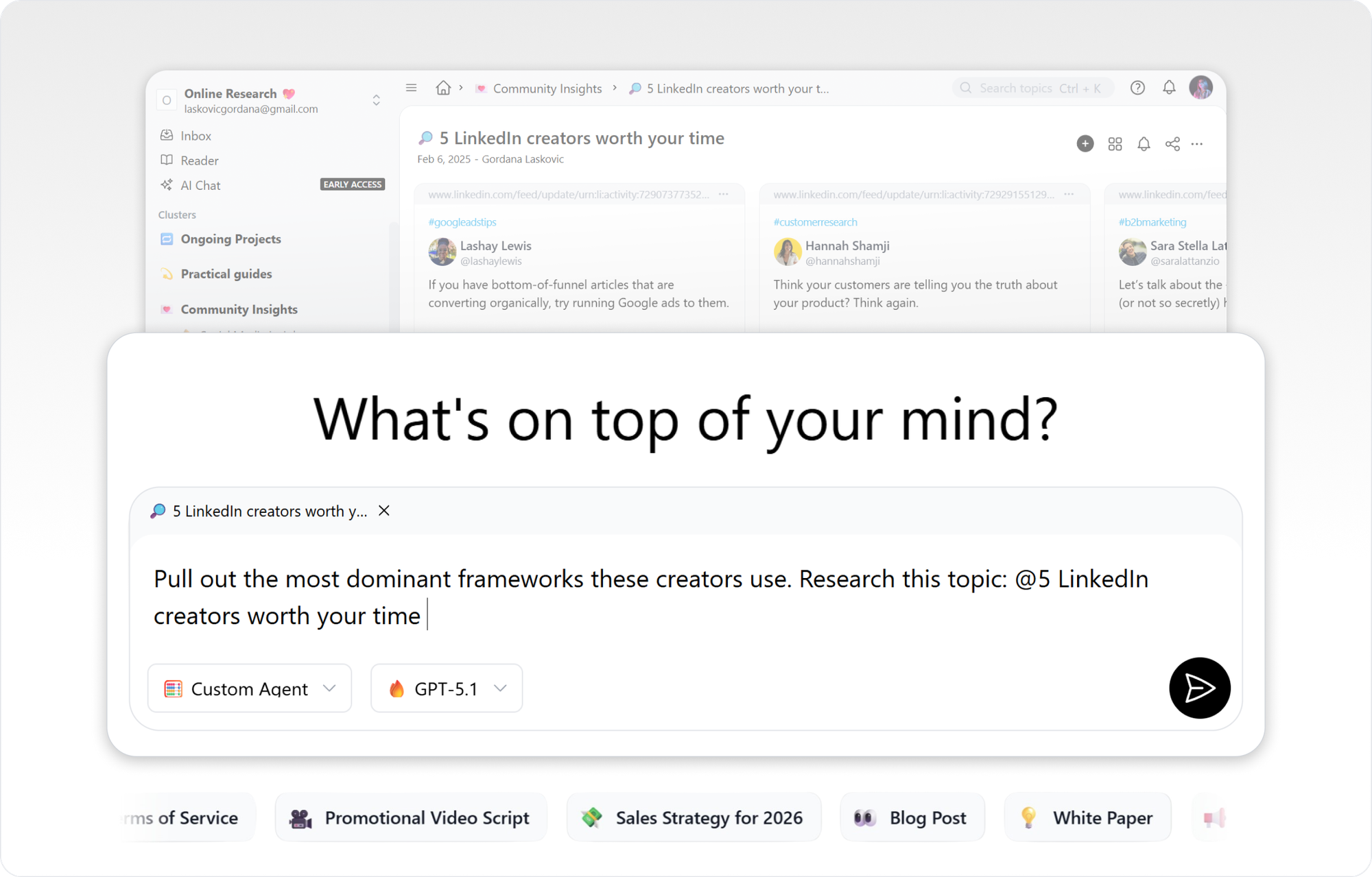
Once you submit your request, the response is generated from two layers:
- insights already stored in your workspace
- verified information from the web
Every answer includes source links, so you can always see where a recommendation came from and trace the reasoning behind it. And the result is very different from a typical AI response.
Instead of abstract suggestions, you get a structured draft grounded in the insights your team has already collected.
Let’s Say You’re Repositioning a B2B SaaS Product - A Practical Use Case
Imagine a team working on repositioning their product.
Over several months, they’ve saved a wide range of materials inside their Cluing workspace:
- competitor positioning breakdowns
- messaging analyses from industry leaders
- notes from customer interviews
- internal product discussions
- campaign examples that stood out
Many of these insights also include comments and observations from the team - quick reactions, additional context, or ideas that came up while reviewing the material.
Individually, these insights are useful. Together, they represent a valuable knowledge base.
But turning that into a clear positioning strategy usually requires a lot of manual work.
Typically, the process looks something like this 👇🏼
- Pull insights from many different sources
- Review saved materials and team comments
- Try to reconnect ideas and synthesize them into a strategy document
With Cluing AI Chat, that process can start differently.
Instead of manually reviewing everything, the team can ask the AI to generate a positioning and messaging strategy based on the insights already stored in the workspace.
Because the AI has access to the team’s saved materials, along with the context added through comments and discussions.
It can analyze the accumulated input and return a structured draft.
The output might include positioning pillars, messaging themes, differentiation angles, content directions, and potential campaign ideas.
Each section is tied back to the original sources, so the team can see exactly how a recommendation connects to specific insights.
And this certainly changes the starting point because the strategy is no longer built from memory or scattered notes. It starts from the knowledge the team has already documented.
Build on your unique context, insights, and rules while collaborating with your team.
Get the offer 👈🏼
From Chat to Canvas - Turning Conversations into a Working Document
Once you’ve refined draft in Chat, the next step is simple: just type “Add research to Canvas and Open Canvas.”
Within seconds, the entire conversation transforms into a structured, visual document - no manual formatting required.
This is what makes Canvas truly useful:
- Canvas organizes insights automatically
- The big picture emerges without extra effort
- You can reopen it anytime to continue refining
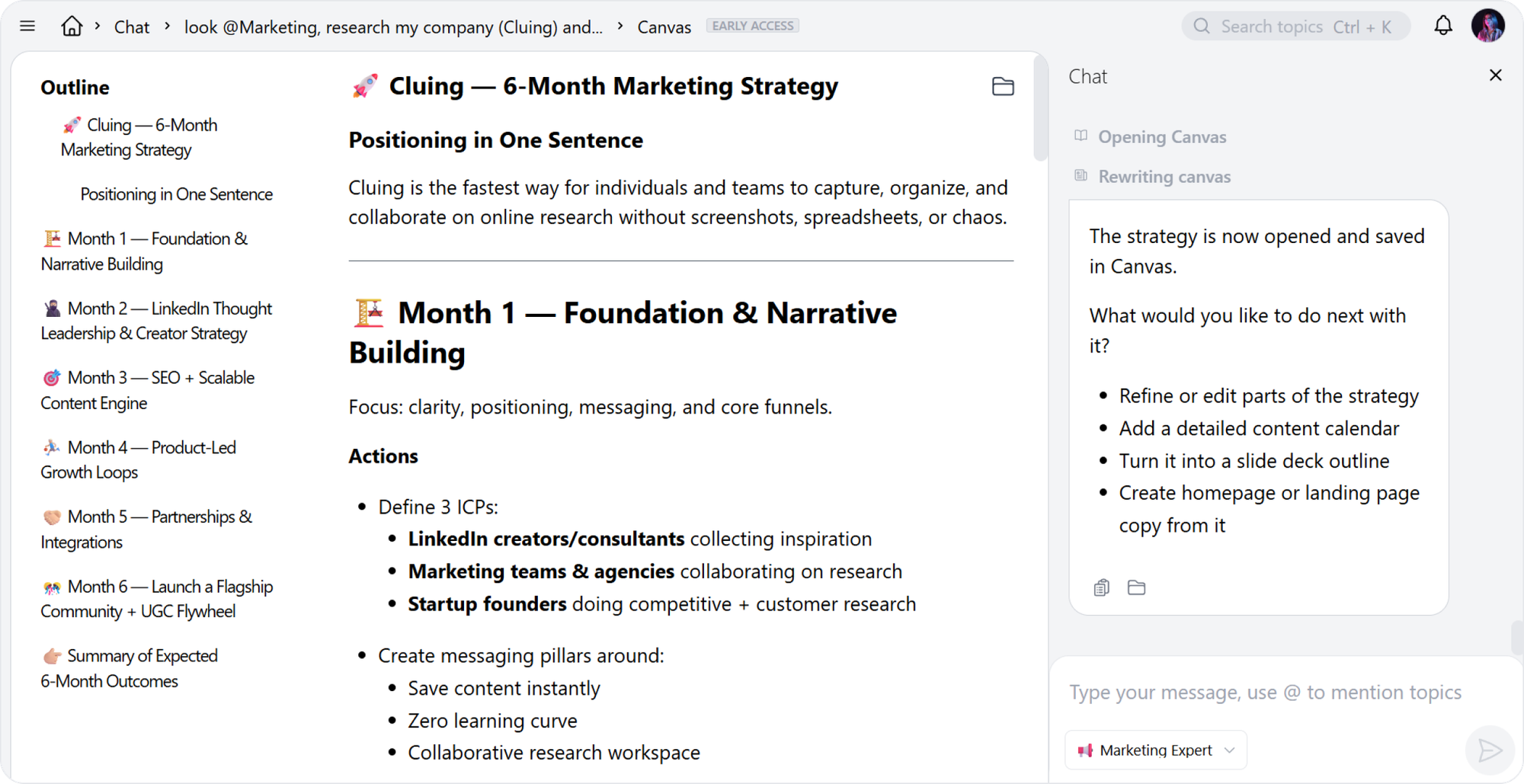
And Canvas isn’t meant to be a finished deliverable. It’s a starting point.
You can click into any section to:
- Rewrite parts that need a more human tone
- Expand promising ideas
- Remove weaker angles
- Adapt the document for a specific campaign or audience
The AI provides the structure. You provide the judgment and refinement.
AI Chat History - Preserving Context Over Time
All your AI conversations are saved in Chat History, so you can search, rename, revisit, or delete past discussions whenever you need.
Instead of losing context between projects, you can build on previous insights and continue evolving your thinking. Strategic ideas don’t disappear after one session, they actually grow with you.
Here’s why Chat History is so powerful:
- It preserves all your past work
- Easy search and organization keep context alive
- You can iterate continuously without starting from scratch
This persistent context is especially useful for long-term positioning, campaign planning, and refining messaging over time.
With Chat History, every conversation becomes part of a living knowledge base, so your work today informs your strategy tomorrow.
Strategy That Moves From Canvas to Execution
Once your strategy is finalized, it’s ready to be put into action and go beyond the Canvas.
You can share it externally with stakeholders or clients - without losing any context. The full conversation can be copied in one click, so everyone sees exactly how the ideas developed.
You can also save the generated document as a snippet and drop it directly into a specific topic in your workspace, making it easy to reference later or continue building on it.

Canvas isn’t just a document. It’s a launchpad. You can reuse it to create:
- Campaign briefs
- Presentations
- Landing page drafts
- Internal planning materials
- Even viral YouTube scripts
The result is a workflow where insights aren’t just stored. They inform real decisions and guide execution, from the first idea to the final campaign.
All Pro models. One shared space.
The new way people collaborate with AI.
No switching tabs, no playing catch up with the latest models.
👉 Your Context
👉 Your Insights
👉 Your Rules
Make Your Insights Count with Cluing AI Chat
The more distinctive and diverse the insights in your workspace, the stronger and more unique your strategy becomes.
With Cluing AI Chat, you can structure everything you’ve already gathered, and Canvas turns it into a living document that evolves over time.
Your ideas, notes, and team comments all stay connected, so your strategy grows with your thinking.
If you’re already collecting valuable insights, the next step is simple: turn them into a strategy inside Cluing.
Every draft, every snippet, and every comment you’ve saved can now feed directly into a real, actionable plan - one you can share, refine, and build on without losing the context that made the insights meaningful in the first place.
With this workflow, insights don’t just sit in your workspace. They drive decisions, shape campaigns, and guide execution, giving you a strategy that’s truly built on everything your team has learned.


![The Best Tool for Collaborative Research in Content Marketing Teams [2026]](/content/images/size/w600/format/webp/2025/12/image--5-.png)

![5 Tools Marketers Use to Organize Research - Compared [2026]](/content/images/size/w600/format/webp/2026/01/Frame-1975.png)


![How Marketers Can Turn LinkedIn Content into Collaborative Research [2026]](/content/images/size/w600/format/webp/2025/10/covers-for-blog--8-.png)