



Your AI is only as smart as the context you provide
Plenty of AI tools let you chat with a document. Drop in a PDF, ask a question, and get an answer. It's quick and certainly worth your time.
But it's just a document at the end of the day.
Everything else is what your document lacks. The hundreds of papers you've read and highlighted over the last week. The late-night comments you leave on articles. The connections you draw when you see them. You have worlds of information but your document can only house a few sheets of paper.
Everything you lose when starting from scratch with a new AI chat is what has inspired and motivated you to find the best answer.
Cluing is built around a different idea: that the most valuable thing you can give an AI isn't a better prompt or a fresher document. It's context that's genuinely, uniquely yours.
Chat with a document. Or chat with your entire knowledge base.
Most tools stop at the document. You upload it, chat with it, get the answers, close the tab.
Cluing goes further because a document is rarely the whole picture.
As you work in Cluing, you build something no one else has.
- You read articles and highlight the parts that matter to you.
- You clip content, leave your own comments and reactions, and organize ideas into Topics.
- You annotate PDFs with your actual thoughts.
- You save snippets not because an algorithm suggested them, but because you decided they were worth keeping.
Over time, that becomes a knowledge base with a point of view - your perspective, your connections, your running understanding of the things you care about.
Cluing's AI Chat taps into the full context you've been building over time.
Instead of working from the open web or generic training data, the AI works from what you've actually collected and curated. The output reflects the specific way you've been thinking about something.
💡 That's not something anyone else can replicate, because no one else has built exactly what you've built.
Chat With Documents: Ask anything about your PDFs
The most direct way to put your context to work is document chat - but in Cluing, that means something more than just uploading a file and asking questions.
Here's what a real session might look like:
You come across a research report. You upload it to a Topic, open it in the Reader, and start highlighting the sections that stand out. You leave comments under the snippets - your reactions, questions, things to revisit. By the time you're done, the file isn't just a document anymore. It's annotated with your thinking.
Then you open AI Chat and @mention the Topic where you saved those snippets. Now the AI isn't just reading the document - it's reading it through your lens. It can answer questions like:
- What's the main argument here?
- How does this compare to what I've already saved on this topic?
- What did I flag as important—and what might I have missed?
- Where's the gap between this report and my existing knowledge?
You can combine multiple documents with one or more @mentioned Topics in the same conversation - everything becomes context for the same chat. And the conversation doesn't vanish when you close the tab: it becomes a session you can return to, build on, and save back into your knowledge base.
How it works: the core AI Chat flow
This same flow powers document chat and knowledge-base chat:
- Open AI Chat from your dashboard.
- Click the upload button on the right of the input field and select your file (PDFs, images, and other document types are supported).
- Type @ to mention a Topic and pull in your saved snippets and comments.
- Ask your question and send.
From there, you can summarize, extract key arguments, compare against saved content, or drill into specific sections, grounded in what's actually in the file and your mentioned Topic.
Chat with your saved knowledge - Snippets, highlights, comments
This is where Cluing gets genuinely different from any generic AI assistant.
When you save a highlight, clip an article, or store a note inside a Topic, that content becomes something you can pull directly into a conversation. Type @, select the Topic, and the AI instantly gains access to everything you've collected there.
What can you do with it?
- Spot patterns - ask the AI to find recurring themes across dozens of saved snippets
- Summarize a topic - get a concise brief of everything you've collected on a subject
- Answer research questions - use your saved knowledge base to get specific, accurate answers
- Discover gaps - ask the AI what's missing or underexplored in your existing research
- Generate content - turn collected insights into hooks, posts, or outlines
For example: "Analyze my topic @ShortFormVideos and write me 10 viral hooks I can use for my next video"
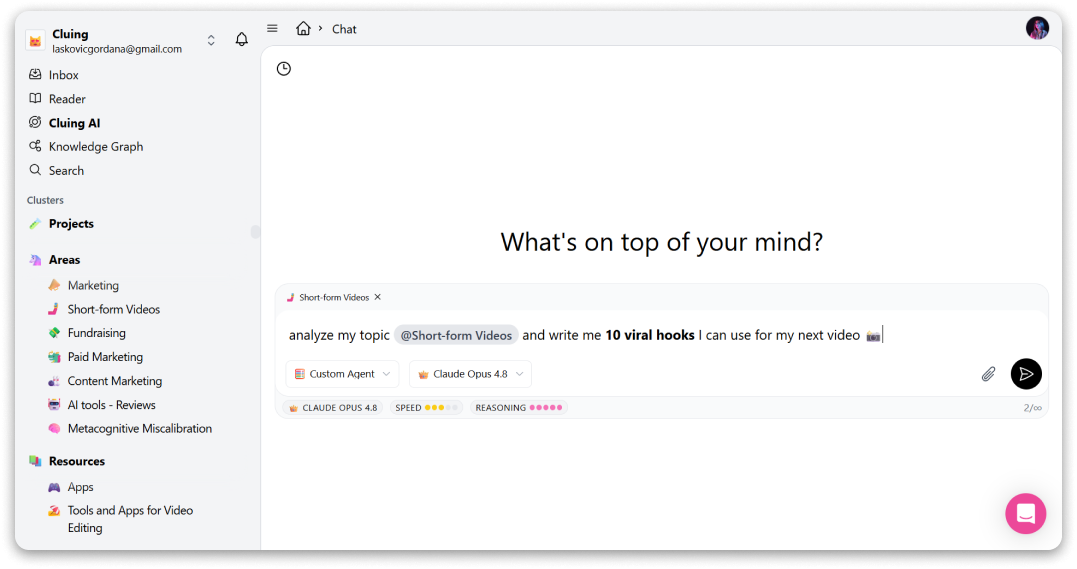
The output reflects the thinking you've already done - months of it, if that's how long you've been building that Topic.
Choose your AI: Agents built for the task, models built for power
Cluing Chat also gives you something most tools don't: a choice of who you're working with.
🪄 Custom AI Agents are specialized assistants already optimized for specific types of work. Instead of prompting a generic AI and hoping for the best, you pick the agent that fits what you're doing:
- Researcher - for gathering, analyzing, and synthesizing information
- Creative Writer - for drafting, refining, and getting tone right
- Marketing Expert - for strategy, positioning, and campaign ideas
- Legal Consultant - for understanding contracts, regulations, and compliance
- Press Release Writer - for polished, media-ready announcements
- Data Analyst - for turning numbers and findings into clear insights
- Code Reviewer - for spotting issues and improving your code
- Workspace Organizer - for keeping your Topics structured and your knowledge base tidy
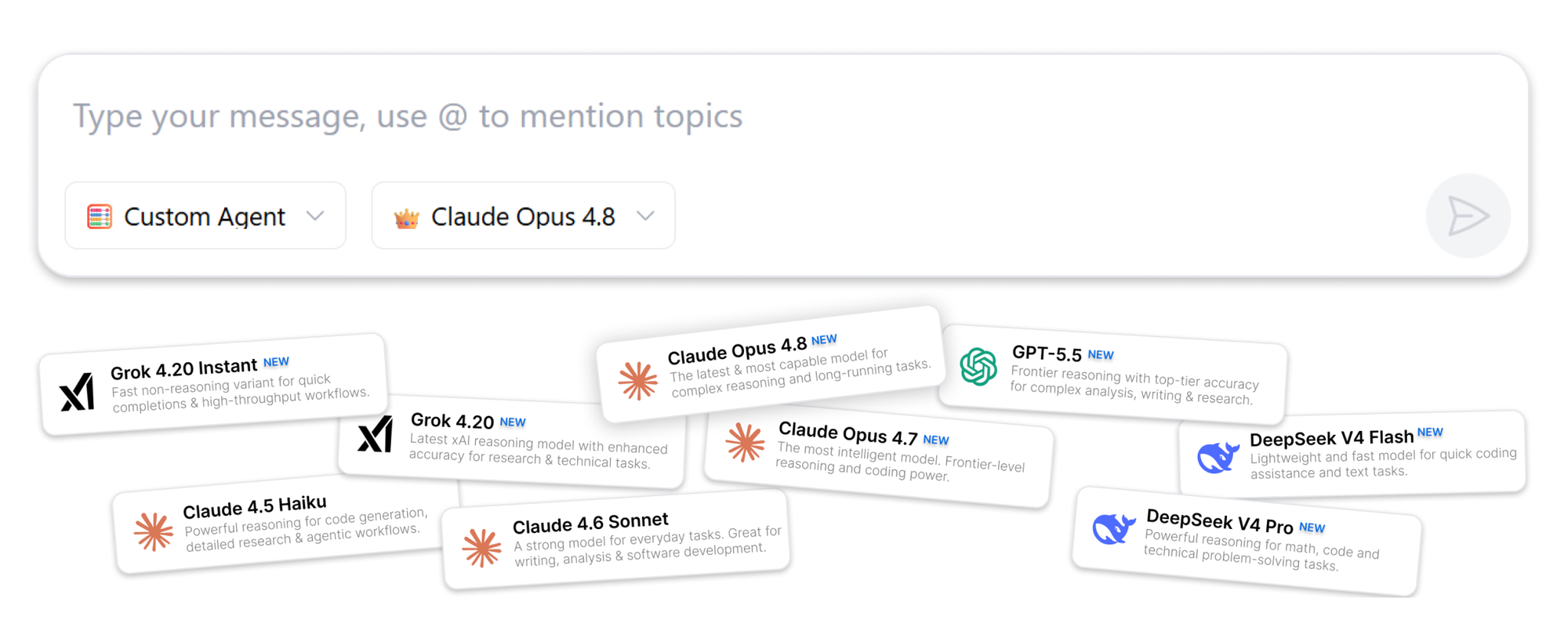
🤖 Pro AI Models give you direct access to the flagship models from the world's leading AI providers - OpenAI, Anthropic, Grok, and DeepSeek - all from the same interface.
Switch between them mid-conversation depending on what the task needs. The context carries through.
Cluing Chat lets you pick not just what you're working with, but who you're working with.
Save AI Responses back into your knowledge base
Good AI conversations produce a handful of responses that are genuinely useful, and then they disappear when you close the tab.
Cluing lets you save any AI response as a snippet directly into a Topic. One click, pick where it goes. Now that insight lives alongside everything else you've collected, and it stays searchable, editable, and available to pull into future chats.
Over time, your Topics grow to include not just the things you found, but the things you figured out. That's a knowledge base that actually compounds.
🎉 Claim Your Special Offer and Get All PRO AI Models in One Chat
Claude, ChatGPT, Gemini - use all of them in one workspace, with shared context that makes every conversation smarter.
AI Canvas - From conversation to finished draft
After gathering insights from documents, your saved Topics, or a live research session, you can transform the entire conversation into a structured, editable document with a single command.
Type "Add to Canvas and Open Canvas" in any chat, and Cluing automatically organizes everything into a clean draft with sections, headers, and a logical flow.
What Canvas gives you:
- A structured document generated from your research in seconds
- Full editing control - click any text to rewrite, expand, or remove sections
- A formatting toolbar with bold, italic, headers, dividers, bullet lists, numbered lists, blockquotes, and code formatting
When you're done, or even mid-way through, you can save the Canvas as a snippet back into a Topic.
From there, you can open it in Cluing's Reader, which means your draft becomes part of your knowledge base too: readable, highlightable, and available to pull into future conversations.
Putting It All Together: A Research Workflow That Actually Works
Here's what an end-to-end Cluing session looks like for someone writing a blog post, research summary, or strategic report:
- Upload a PDF (research paper, report, or brief) into AI Chat
- @Mention a Topic with your previously saved highlights and notes on the subject
- Ask the AI to synthesize both - finding patterns, gaps, and key arguments
- Save the best AI responses as snippets back into your Topic for future reference
- Open Canvas to turn the entire research session into a structured draft
- Edit and refine the document directly in Canvas with the built-in formatting toolbar
- Publish, share, or continue building - everything stays in your workspace
What used to take hours of manual synthesis now happens in one fluid session, and everything you produce feeds a growing, searchable knowledge base that makes every future session smarter.
PDF Document Management: Holding it all together
Beyond the AI layer, Cluing includes a complete PDF management system that makes documents searchable, collaborative, and reusable.
You can:
- Open online PDFs directly in Cluing without downloading them first
- Upload PDFs to your workspace for permanent storage and access
- Highlight passages in custom colors to mark what matters and save them as reusable snippets
- Collaborate on the same PDF with teammates, keeping discussions attached to the relevant content
- Search within PDFs to instantly find specific pages, sections, or keywords
- Access recently uploaded documents from a dedicated recent files view
Every PDF becomes part of your knowledge base, connected to AI Chat, your Topics, and your snippet library, ready to search, reference, discuss, and reuse.
Who is Cluing built for?
If you've ever highlighted an article, saved a snippet, or annotated a document and then watched an AI give you a generic answer that could have come from anywhere, you know the frustration.
Cluing is built for people whose work depends on collecting, organizing, and turning information into something useful. Instead of treating research as disposable context, it keeps everything connected - from the sources you save to the documents you create.
It's especially valuable for:
- Content creators who research before writing and want to stop starting from scratch
- Researchers and analysts who read many documents and need to extract and synthesize findings
- Marketers and strategists who build on saved competitive intelligence and market research
- Knowledge workers who want their AI tools to actually know what they already know
The core idea: AI that knows what you know (and helps fill in what you don't)
The difference between a generic AI chatbot and Cluing's AI Chat is context.
Generic tools work with what you type in the moment. Cluing works with the entire body of research you've built over time - your highlights, your saved snippets, your uploaded documents, your curated Topics.
The result is AI that gives you answers grounded in your work, not just the open web. Outputs that reflect your research, not generic summaries. Documents that are ready to be yours, not just plausible first drafts from a model that's never seen your data.
That's what chat with documents actually means.
Ready to try it? Get started with Cluing and start a conversation with your own research.
FAQs 🧐
Can I upload multiple documents at once?
Yes. You can upload multiple files into the same conversation, and combine them with @mentioned Topics on top of that, so your chat can draw from a wide range of sources all at once.
What file types can I upload?
You can upload documents (like PDFs and other file types) and images directly into AI Chat in Cluing. Just drop in a file, ask a question, and get instant answers - without leaving the conversation.
Which AI models are available?
Cluing gives you access to pro models from OpenAI, Anthropic, Grok, and DeepSeek - all from the same interface. You can switch between models at any point in a conversation without losing context.
What's the difference between an AI Agent and a Pro Model?
Agents are pre-configured assistants optimized for specific types of work - writing, research, legal review, data analysis, and so on. Pro Models are the raw flagship models you can prompt however you like. You can use either, or combine them in the same session.
Do I need different subscriptions to access different AI models?
No. Cluing gives you access to multiple pro models under one roof. No need to maintain separate subscriptions to OpenAI, Anthropic, or others.
What happens to my AI Chat responses - do they disappear?
No. Cluing keeps a full history of your conversations, so you can always go back and find something from a previous session. And if a response is worth keeping alongside your other saved content, you can save it as a snippet into any Topic with one click, making it a permanent, searchable part of your knowledge base.


![The Best Reddit Threads Disappear in a Week. Here's How to Keep Them [2026]](https://storage.ghost.io/c/9f/9d/9f9d32ee-55b4-4411-b435-9dc854e1751c/content/images/size/w600/format/webp/2026/06/reddit-cover.png)

![Read it later system for LinkedIn posts - Save, organize, and use what you find [2026]](https://storage.ghost.io/c/9f/9d/9f9d32ee-55b4-4411-b435-9dc854e1751c/content/images/size/w600/format/webp/2026/06/blog-3.png)


![Cognitive Capital - The New Layer of Value [2026]](https://storage.ghost.io/c/9f/9d/9f9d32ee-55b4-4411-b435-9dc854e1751c/content/images/size/w600/format/webp/2026/05/covers--9-.png)