



This guide looks at why Reddit doesn't fit the classic read it later model, and how to actually save, organize, and reuse the best things you find there - posts and comments both.
Read it later apps were built for one shape of content: articles, at stable URLs, that you'll get around to eventually. Pocket, Instapaper, Readwise - all designed around that assumption.
Reddit doesn't look anything like that.
And yet Reddit is, quietly, one of the best sources of unfiltered, lived-experience knowledge on the internet. Not polished advice. Not SEO-optimized listicles. Actual answers from people who've done the thing - debugged the exact error, run the exact experiment, made the exact mistake you're about to make.
Often the real value isn't even the post. It's the third comment down, written by someone with fifteen years in the field, that quietly contradicts the top answer and happens to be right.
The problem is that none of it sticks around, and almost none of it is organized in a way you can use later.
Reddit Doesn't Play by the Read-It-Later Rules
The classic read it later assumption is: the content has a stable home, you'll have time to come back to it, and finding it again won't be hard. Reddit fails on all three.
Posts and comments vanish constantly. Authors delete their accounts. Moderators remove threads. Comments get deleted by their author the moment a conversation turns. Entire subreddits go private or get banned. A thread you bookmarked last month might just be [deleted] when you go back to it.
Reddit does have a native save button, on both posts and comments, so it's not like there's no option. But it solves very little of the actual problem:
- Your saves stop being reliably tracked once you pass roughly 1,000 items - older saves quietly drop off the list, with no warning.
- There's no search inside your saved list. None. You scroll, in reverse chronological order, until you find it or give up.
- There are no folders, no tags, no topics - posts and comments all land in the same flat pile, distinguishable only by a basic post/comment filter.
- If the original gets deleted, your saved copy is gone too. Saving it did not protect it.
So what most people actually do is read the thread, mentally file it under "useful," and move on - trusting they'll remember it or find it again with a search. Usually, you do neither.
The Real Cost of Scrolling Past It
Think about what shows up in your Reddit feed in a normal week, across the subreddits you actually care about:
- A technical answer that solved a problem you'd been stuck on for hours, buried three replies deep in a thread.
- A first-hand account from someone who actually went through the process, decision, or purchase you're considering.
- A blunt, unfiltered opinion that cuts through the marketing language everywhere else online.
- A genuinely good explanation of something complicated, written by a stranger with no incentive to oversimplify it.
That's not noise. For researchers, builders, and anyone trying to make a real decision, that's primary-source insight you won't find phrased the same way anywhere else.
Out of everything useful you've read on Reddit this year, how much of it could you actually find again today?
For most people, almost none. You remember the gist. You remember it existed. You cannot locate it, and you definitely can't hand it to a teammate or drop it into something you're writing. That gap is the real cost of Reddit's native save button - it gives you the feeling of having kept something, without the substance.
Saving Threads and Comments the Right Way - How Cluing Works for Reddit
Cluing is an AI-powered knowledge base built to capture insight from anywhere - newsletters, LinkedIn posts, articles, PDFs, YouTube videos, Kindle highlights - and turn it into something organized and usable instead of a pile you'll never revisit. Reddit works the same way.
1) Open the extension on Reddit
No setup required beyond having the Cluing browser extension installed. Go to Reddit as you normally would, and open the extension while you browse.
2) Save posts with one click
You'll find a "Save" button beneath each post on your Reddit home page.
Click it, and Cluing automatically captures the post's content and stores it as a snippet inside the extension - so it's there to revisit whenever you need it, even if the original post later disappears.
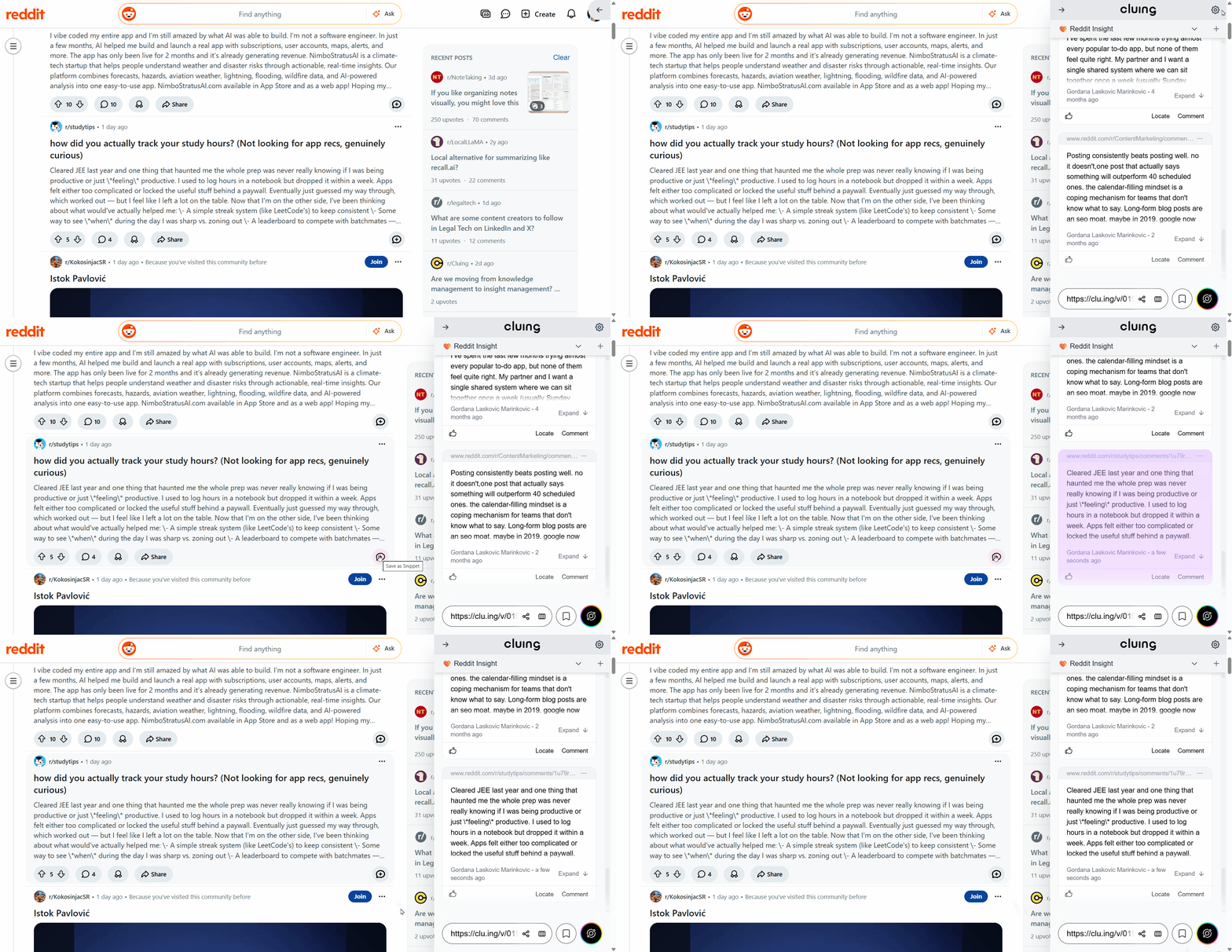
3) Save individual comments too
This is where Reddit differs from most other platforms: often the comment matters more than the post itself. Cluing accounts for that.
Next to each comment, you'll see its own "Save" button. Click it, and that specific comment - not the whole thread, just the part that mattered - gets captured as its own snippet.
You're not stuck saving an entire wall of replies to keep the one reply that was actually useful.
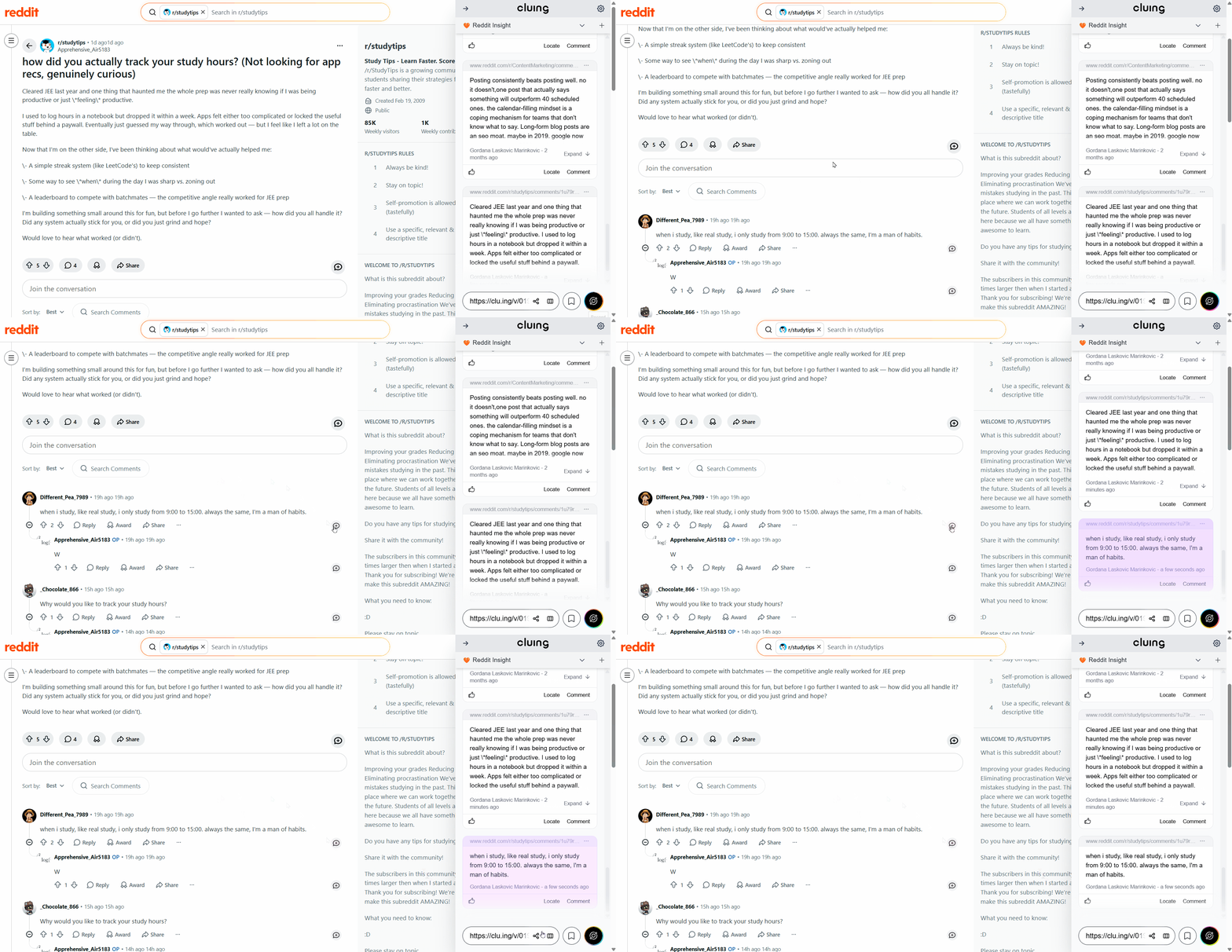
4) Sort what you save into topics
As with everything else in Cluing, saved Reddit posts and comments don't have to live in one undifferentiated list.
Drop them into topics organized however makes sense to you - by subreddit, by project, by question you're trying to answer. A saved comment about debugging a specific error can sit right next to a saved article on the same subject, instead of being stranded in a Reddit-only silo.
5) Search, revisit, and build on it
Once a handful of Reddit posts and comments are sitting inside a topic, you have something Reddit's own save list never gives you: a searchable, organized collection.
Look something up by keyword. Open the topic and scroll through everything you've gathered on the subject. Add your own notes underneath a saved comment to capture why it mattered.
And because Cluing's AI Chat works directly across your saved content, you can ask it to summarize the different opinions you've collected on a topic, pull out the recurring advice across several threads, or help you draft something grounded in what real people actually said - not generic training data.
From Scattered Saves to an Actual Archive
The pattern with Reddit's native save is familiar: you save things for months, and at the end of it you have a long, unsearchable list and basically nothing usable. Every time you need that information again, you're starting from zero, hoping the post is still there and that you remember roughly where it was.
That's the cycle Cluing breaks. After a few weeks of saving consistently, a topic stops being a list and starts being a reference. You're not hoping you remember the right Reddit thread anymore - you're opening a topic that already has the answer, the comment, and your own notes attached.
And it keeps compounding. The comment you saved on a technical problem six months ago is still there, still searchable, still useful, regardless of whether the original thread, the original commenter, or the original subreddit still exists.
A read-it-later app defers reading. A knowledge base makes what you've already read worth something later.
Is Cluing Actually for You?
Picture the moments this actually matters: you're debugging the same error for the third time, and the fix is sitting in a two-year-old comment you have no hope of relocating. You're weeks into researching a big purchase, and half your real evidence is scattered opinions from strangers in a niche subreddit. You run or help moderate a community, and the genuinely useful advice in your own threads is already buried under everything posted since.
That's not casual scrolling. It's research that happens to look like a hobby from the outside.
If your relationship with Reddit is closer to skim-laugh-move-on, none of this will change much for you, and the native save button does the job fine.
But once a subreddit becomes somewhere you actually rely on for real answers, "I read that somewhere" stops being a funny inconvenience and starts costing you time.
And since topics in Cluing aren't tied to one person's account, the threads you dig up can end up useful to whoever else is working the same problem - a teammate, a co-moderator, anyone you'd otherwise have to re-explain the whole thing to.
Start saving Reddit posts and comments where they'll actually still be there later.
Get started →
FAQs 🧐
Why doesn't Reddit's native save feature work well long-term?
It caps out at roughly 1,000 saved items with older ones quietly dropping off, has no search inside your saved list, and offers no folders or tags - just one flat, scrollable pile. If the original post or comment gets deleted, your saved copy disappears with it.
Can I save Reddit comments, not just whole posts?
Yes. Each comment has its own "Save" button next to it, so you can capture the one reply that mattered without saving the entire thread around it.
What happens if the Reddit post or comment I saved gets deleted later?
Once it's saved as a snippet in Cluing, the content is yours - it survives even if the original is removed, the author deletes their account, or the subreddit goes private.
How do I organize what I save from Reddit?
Drop saved posts and comments into topics, the same way you would with content from newsletters, LinkedIn, or articles. You can organize by subreddit, project, or whatever structure fits how you think.
Can Cluing's AI work across my saved Reddit content?
Yes. AI Chat can summarize the different opinions you've collected on a subject, surface recurring advice across multiple threads, or help you draft something grounded in what you've actually saved.
Can I share what I've saved from Reddit with my team?
Yes. Topics are shareable, so useful threads and comments one person finds become a collective resource instead of staying in a single person's saved list.


![Read it later system for LinkedIn posts - Save, organize, and use what you find [2026]](https://storage.ghost.io/c/9f/9d/9f9d32ee-55b4-4411-b435-9dc854e1751c/content/images/size/w600/format/webp/2026/06/blog-3.png)


![Cognitive Capital - The New Layer of Value [2026]](https://storage.ghost.io/c/9f/9d/9f9d32ee-55b4-4411-b435-9dc854e1751c/content/images/size/w600/format/webp/2026/05/covers--9-.png)