


![Read it later system for LinkedIn posts - Save, organize, and use what you find [2026]](https://storage.ghost.io/c/9f/9d/9f9d32ee-55b4-4411-b435-9dc854e1751c/content/images/size/w2000/format/webp/2026/06/blog-3.png)
This guide looks at why traditional read-it-later apps don't work well for LinkedIn posts, and how to build a system that helps you save, organize, and actually use the insights you discover while scrolling.
Read it later apps have been around for years, and they're genuinely useful for one thing: long-form articles you want to get to eventually. Pocket, Instapaper, Readwise - they all handle that well enough.
But LinkedIn posts were never part of the design. And nobody has really solved for that.
Which is a real problem, because LinkedIn is quietly one of the best places on the internet right now for practical, experience-based thinking. Not polished thought leadership. The real stuff - marketers sharing what actually moved their pipeline, growth operators breaking down what didn't work, founders being honest about what they'd do differently. Short posts, sharp insights, written by people who've lived through the thing they're describing.
The catch is that LinkedIn posts disappear. Quickly and without warning. The author deletes it. The algorithm stops surfacing it. LinkedIn's own search fails to return it when you go looking. And unlike articles, there's no reliable URL to bookmark, no archive to fall back on. Once it's gone, it's gone.
No read it later app was built to catch content like that.
Why LinkedIn Posts Don't Work with Existing Read it Later Tools
The read it later model assumes a few things: that the content lives at a stable URL, that you'll have time to read it later, and that finding it again won't be a problem.
LinkedIn breaks all three of those assumptions.
Posts don't have reliable permalinks. They're gone or buried within days or weeks. And even when a post is still technically live, LinkedIn's search isn't built for retrieval - it's built for discovery. Searching for something you've already seen is a frustrating experience on the best day.
LinkedIn does have a native save button, but it solves almost none of this. Your saved posts land in a single undifferentiated list - no folders, no topics, no way to group by author, theme, campaign, or project.
Finding something specific means scrolling through everything you've ever saved, in reverse chronological order, with no search. And that's assuming the post is still there. If the author deleted it after you saved it, LinkedIn removes it from your list too. You saved it. It's still gone.
So what most people do is nothing. They read the post, they appreciate it, they move on. They figure they'll remember the idea, or they'll find it again when they need it.
They won't. And that's a real cost, even if it's not a visible one.
What You're Actually Losing
Think about what your LinkedIn feed actually contains on a good week.
- Frameworks for writing hooks that convert.
- Real breakdowns of campaigns that underperformed and why.
- Case studies from people in your exact space, describing the decisions they made and what happened.
- Counterintuitive takes that genuinely shifted how you think about something.
That's not throwaway content. For B2B marketers and growth teams, that's competitive intelligence. It's the kind of thing that, if you could actually organize and revisit it, would make your content sharper, your strategy more grounded, and your team's thinking more aligned.
Now ask yourself honestly: how much of that are you actually retaining?
For most people, the answer is almost none of it. You read something valuable, you think "I should hold onto this," and you don't. By the time you're writing a post, briefing an agency, or planning a campaign, you can't find the thing you remember reading. You know it exists but you can't locate it.
That's the gap. And it compounds over time.
How Cluing Works as a Read it Later App for LinkedIn
We added LinkedIn as one of Cluing's first integrations because our own marketing team needed a better way to save and organize posts.
We were spending real time on LinkedIn every week. Reading posts, finding things worth keeping, and then losing them anyway. The research that should have been informing our content strategy was just... evaporating.
Someone from the team would find a great breakdown of a B2B campaign, save it in LinkedIn, and two weeks later it was either gone or buried so deep in the list that it might as well not exist.
We couldn't organize anything by topic or theme. We couldn't share what we'd found with the rest of the team in any structured way. And we certainly couldn't ask an AI to synthesize across it.
So we stopped tolerating it and built the fix directly into Cluing. Here's how it works:
Install the Cluing browser extension
Once the extension is installed, a Save button appears directly inside your LinkedIn feed; no copying URLs, no switching tabs, no interrupting your scroll. When you spot something worth keeping, you save it on the spot.
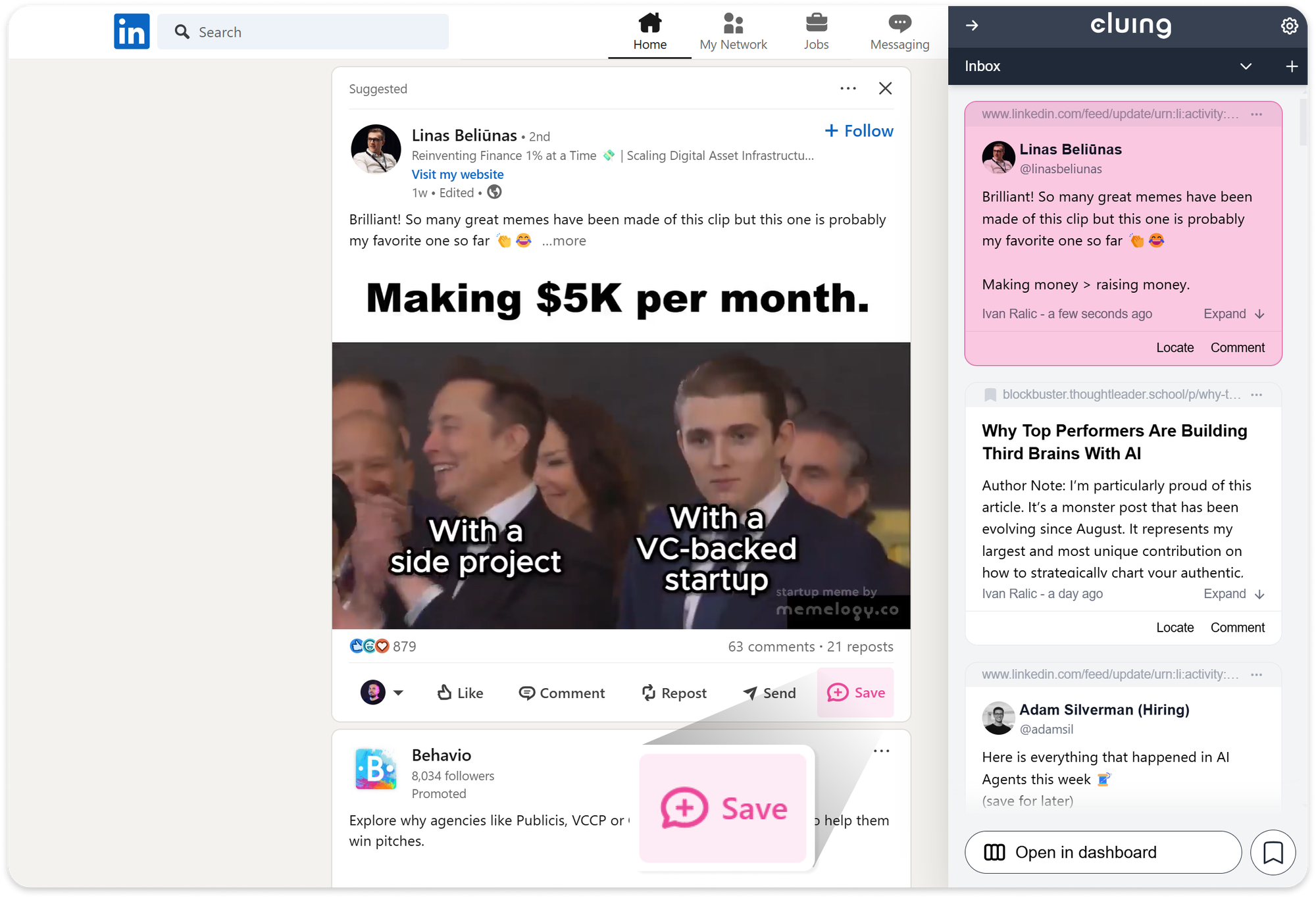
You have two options at that moment.
- If you're in reading mode and just want to capture quickly, you save it straight to your Inbox and sort it into the right topic later.
- If you already know where it belongs, you add it to a topic right away. Either way, the post is yours - captured in full, not just linked.
- Chrome Webstore
- Edge Add-OnsFire
- Fox Add-Ons
Create topics to organize as you go
Topics are what turn a pile of saved posts into something you can actually use. Think of them as your own categories, structured around how you and your team actually think, not how some app decided to organize things for you.
A B2B marketing team might set up topics like "Hooks and formats that convert," "Demand gen case studies," "Competitor positioning," or "Campaign ideas for Q3." A growth operator might organize by channel, by stage of the funnel, or by the problem they're trying to solve.
There's no right answer. The point is that when you save something, it goes exactly where it belongs, not into a flat list you'll never sort through.
And because topics are shareable, the research one person builds up doesn't stay siloed. Your whole team can contribute to and draw from the same organized collection.
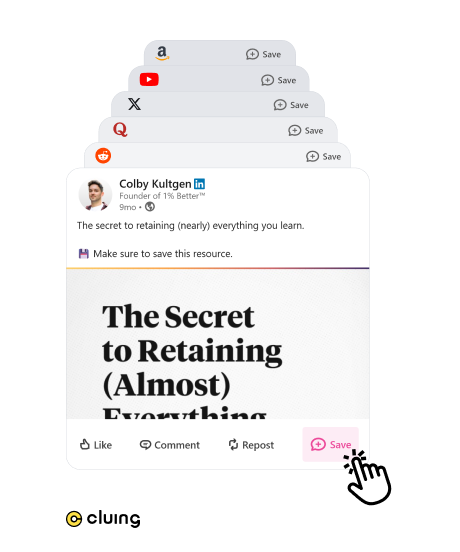
Save any LinkedIn post with one click
Hit the "Save" button under any post in your feed. Cluing captures the full content of the post, not just a link, but the actual text, and stores it as a snippet in the relevant topic.
You can also add comments directly below the snippet to capture your thoughts, ideas, or why the post stood out in the first place.
This matters because it means your saved posts survive even if the original gets deleted. What's in Cluing is yours, permanently.
Search and browse what you've built
As your topics fill up, you end up with something genuinely useful: a curated collection of LinkedIn content, organized around your actual priorities, searchable when you need it.
- Looking for examples of how people position against enterprise competitors? Search it.
- Need inspiration for a post on pipeline generation? Browse the topic you've been building for months.
This is what read it later apps promised and mostly didn't deliver. Not deferred reading but actual retrieval.
Use AI Chat to synthesize across everything you've saved
This is where Cluing goes beyond a simple read it later tool.
Once you've built up a collection, you can open AI Chat and ask it to work across your saved content.
- Ask it to identify the common patterns in the posts you've saved on lead generation.
- Ask it to pull out the three most-cited tactics from your B2B content topic.
- Ask it to compare how different writers in your space approach the same problem.
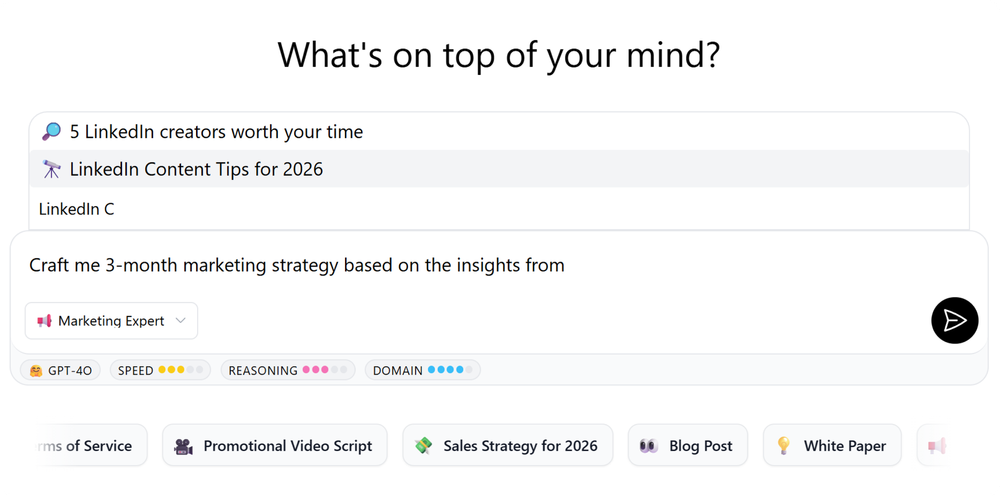
Instead of manually re-reading 40 saved posts to find the thread that connects them, you get a synthesis in seconds, drawn from content you chose, filtered by your own judgment.
 Gordana Laskovic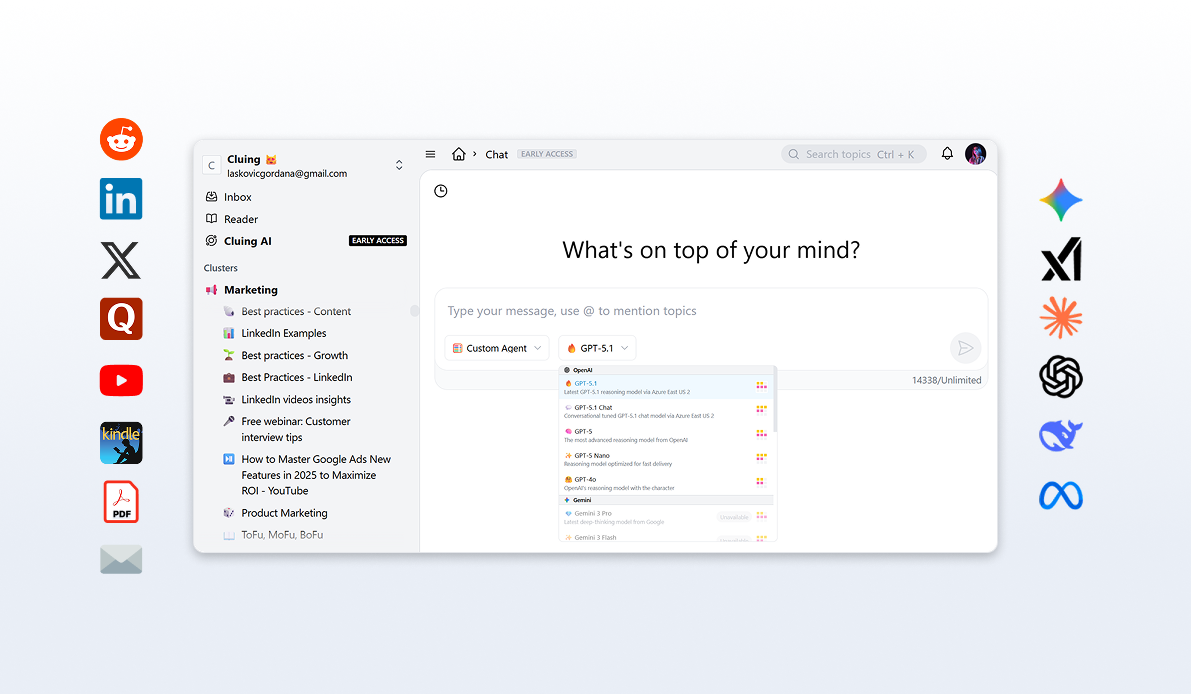
Draft LinkedIn posts directly from your saved insights
When you're ready to write, Canvas takes your collected research and turns it into a draft.
Give it a prompt: "Write a LinkedIn post on demand gen for mid-market SaaS, based on what I've saved" and the AI works from your specific context, not from generic training data.
The result is a draft that's grounded in real examples, aligned with what you've seen work, and written for your audience. Not something that sounds like it could have come from anyone. Something that reflects the research your team has actually done.
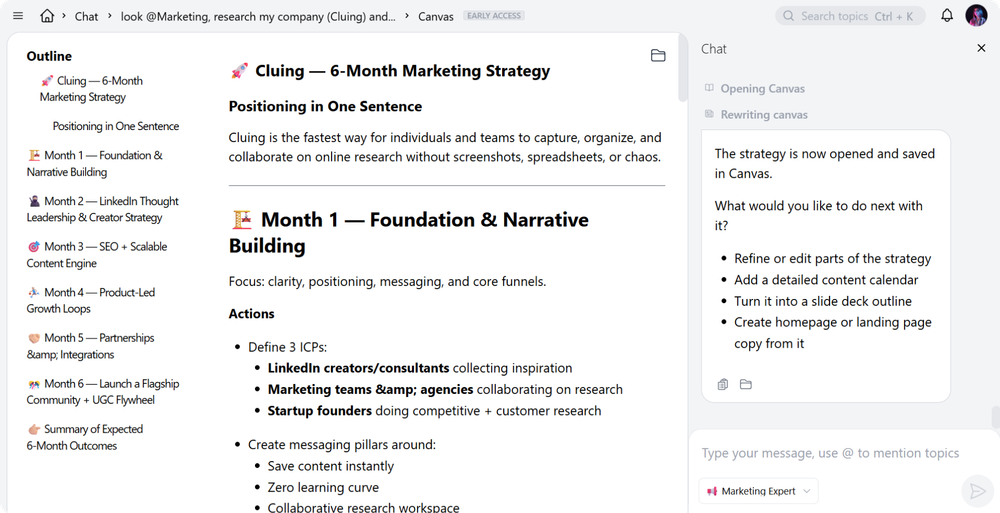
From there, you can refine the tone, adjust the structure, add your own perspective, and make it yours. Every suggestion traces back to the original source you saved, so nothing is invented from thin air.
Why a Read It Later System Gets More Valuable Over Time - The Compounding Effect
Most B2B marketers we talk to describe the same cycle: you spend time on LinkedIn, you find things worth keeping, and then you start from scratch the next time you need to write something or plan a campaign anyway.
The research doesn't carry forward. It just disappears back into the feed.
That's what actually changes when you start saving consistently into Cluing.
After a few weeks, the difference isn't just that you have more saved posts. It's that your work starts to feel less repetitive.
- When you sit down to write a LinkedIn post, you're not staring at a blank page. You're opening a topic that already has fifteen examples of formats that worked, annotated with what made them land.
- When you're briefing an agency or aligning your team on messaging, you're pulling from a shared collection of real-world examples, not trying to reconstruct something someone vaguely remembers seeing.
That's a library. And it compounds.
Every new post you save adds to an existing body of knowledge. Every time you use AI Chat to synthesize across your saved content, you're drawing on everything that came before.
Every piece of content you create from Cluing is more grounded than the one before it, because you're building from a real foundation rather than starting from scratch.
This is the difference between a read it later app and a thinking tool. One holds things you haven't gotten to yet. The other makes you progressively better at what you do.
Saved Posts That Actually Stay Saved
LinkedIn's native save feature sounds useful until you actually try to use it.
Everything lands in one flat list, no way to organize by topic, author, campaign, or anything else. There's no search within your saved posts, no folders, no buckets. Just a growing pile in reverse chronological order that becomes harder to navigate the more you use it. And if the original post gets deleted, your saved version disappears with it.
It's not a knowledge system. It's a waiting room where things go to be forgotten.
What you save in Cluing stays. It lives in your workspace, attached to the topic where you put it, accessible on your timeline. Not LinkedIn's.
If you work with a content team, a marketing partner, or anyone else who'd benefit from the same research, your topics can be shared. The posts one person saves and finds useful become a shared resource for the whole team, with context, comments, and discussion attached.
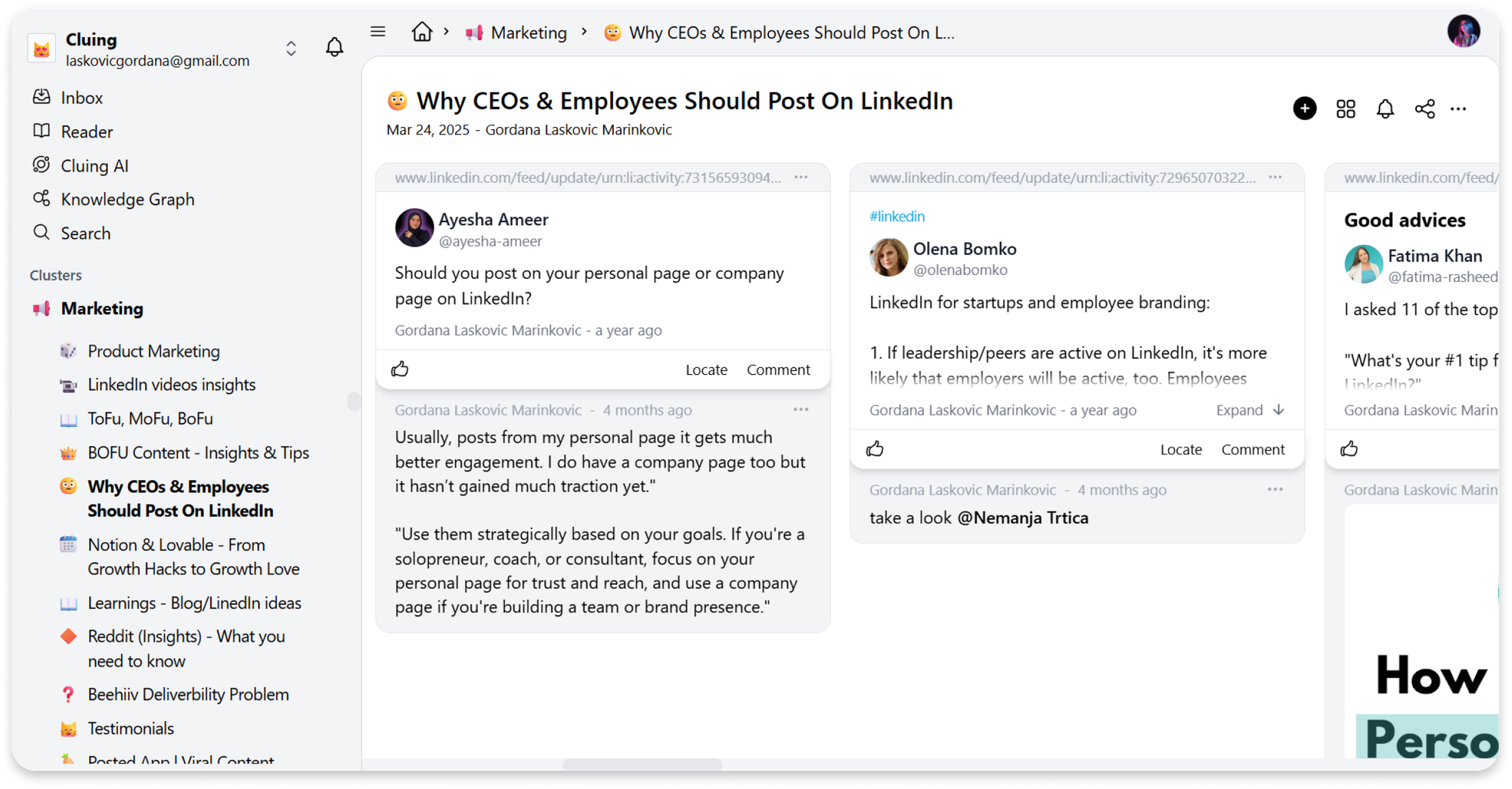
Everyone builds from the same foundation instead of maintaining separate, invisible collections of things they've seen and half-remember.
Who Needs a Read It Later App for LinkedIn?
If you scroll LinkedIn occasionally and treat it as background noise, you don't need this. A bookmarking tool or LinkedIn's native save feature is probably enough.
But if you're a B2B marketer or part of a growth team that takes LinkedIn seriously- reading it to stay current, to find examples, to understand what's working in your space, and you've felt the frustration of knowing you saw something valuable and not being able to use it when you need it, Cluing was built for exactly that.
The LinkedIn post you read this morning is only worth something if it's still with you three months from now, when you're planning the campaign that needs it.
Connect LinkedIn with Cluing and start building a knowledge base that actually compounds. Get started →
FAQs 🧐
What is a read-it-later app for LinkedIn posts?
It’s a tool that lets you save LinkedIn posts, organize them, and retrieve them later instead of losing them in the feed.
Why don’t traditional read-it-later apps work well for LinkedIn?
Because LinkedIn posts don’t have stable URLs, disappear quickly, and can’t be properly organized or searched in most save systems.
What's wrong with LinkedIn's native save feature?
Everything lands in one flat, unsearchable list. You can't organize by topic, and if the original post is deleted, your saved copy disappears too.
How does Cluing actually capture a LinkedIn post?
A browser extension adds a Save button directly under a post. One click captures the full post text (not just a link) so it's preserved even if the original is later deleted.
How does Cluing actually capture a LinkedIn post?
A browser extension adds a Save button directly under a post. One click captures the full post text (not just a link) so it's preserved even if the original is later deleted.
Can my whole team use the same saved content?
Yes. Topics can be shared, so research one person saves becomes a collective resource rather than staying siloed.
What can AI Chat do with my saved posts?
It synthesizes across everything you've saved - finding patterns, surfacing common tactics, or comparing how different writers approach the same problem - without you manually re-reading dozens of posts.
How does Canvas help with content creation?
You give it a prompt and it drafts LinkedIn posts grounded in your saved research, not generic training data. Every suggestion traces back to a real source you saved.
Who is Cluing actually for?
B2B marketers and growth teams who use LinkedIn seriously- not as background noise, but as a source of competitive intelligence and content inspiration they need to actually retain and use.


![The Best Reddit Threads Disappear in a Week. Here's How to Keep Them [2026]](https://storage.ghost.io/c/9f/9d/9f9d32ee-55b4-4411-b435-9dc854e1751c/content/images/size/w600/format/webp/2026/06/reddit-cover.png)


![Cognitive Capital - The New Layer of Value [2026]](https://storage.ghost.io/c/9f/9d/9f9d32ee-55b4-4411-b435-9dc854e1751c/content/images/size/w600/format/webp/2026/05/covers--9-.png)