



Cluing vs Obsidian - Two Tools, Two Different Problems
It is important to discuss the specifics of these two tools before comparing them. Most comparisons overlook this, and a lot of confusion comes from that.
Obsidian is a personal knowledge management (PKM) tool. It stores everything as plain Markdown files on your local device, which means you own your data completely and can access it without an internet connection.
It has a rich plugin ecosystem with thousands of community-built extensions, a powerful graph view to visualize connections between notes, and deep customization options. It's beloved by researchers, developers, and knowledge enthusiasts who enjoy building their own system from the ground up.
The operative word is personal. Obsidian is designed for one person's brain. Everything it does well - local storage, Markdown-based notes, plugin flexibility, graph view is optimized for an individual who has full control over their own vault and wants to keep it that way.
Cluing is a knowledge management tool that works for both individual users and teams. It's designed around a fundamentally different premise: that the most valuable knowledge, whether it belongs to one person or an entire team, should be easy to capture, structure, and share.
Where Obsidian is built for depth in a single user's mind, Cluing is built for breadth across a team's collective intelligence.
This distinction matters more than any feature comparison, because it determines which tool is right before you look at a single spec.
Who Actually Uses Obsidian and Why They Love It
Obsidian's most devoted users share a common trait: they want to build their own knowledge system, exactly the way they want it, with no tool telling them how to think.
Students, researchers, writers, developers, IT professionals, filmmakers, consultants - the use cases are wildly varied. What they all have in common is that they're working alone, and they like it that way.
At its core, Obsidian works like a personal Wikipedia. You write notes in Markdown, link them together with a [[double bracket]] syntax, and over time a web of connected knowledge emerges. The graph view makes those connections visible. Hover over a link, and you instantly see the referenced note without leaving what you're reading. Embed one note inside another, and they stay in sync automatically.
For this kind of deep, personal knowledge building, Obsidian is genuinely hard to beat. It's fast, fully offline, completely private, and your data is just plain Markdown files - readable by any text editor, owned by you forever, with no vendor lock-in.
The plugin ecosystem extends this further, adding web clipping, task management, spaced repetition, kanban boards, and more for those willing to configure it.
But that last phrase is the catch. Obsidian is, by design, unopinionated. It gives you a blank canvas and a pile of tools and lets you build whatever you want.
For the right person, that's liberating. For a team that just needs to get things done together, it's a starting point that never quite ends.
What Happens When Teams Try to Use Obsidian
Obsidian's architecture is built around a local vault, a folder of Markdown files stored on one person's device. That's its greatest strength for individuals and its biggest liability for teams.
Here's what that looks like in practice.
No Real-Time Collaboration
Obsidian Sync allows shared vaults, but it explicitly does not support live co-editing.
Two people editing the same note at the same time will create a merge conflict on the next sync. There's no live cursor, no simultaneous editing, nothing close to what Google Docs or any modern writing/collaboration tool offers.
No Granular Permissions
Every collaborator on a shared vault gets the same level of access as the vault owner. There's no way to give someone read-only access, restrict editing to certain areas, or differentiate between a viewer and an editor.
For teams managing sensitive research or client knowledge, this is a real problem.
A Hard Cap of 20 Users
Obsidian Sync limits shared vault collaboration to a maximum of 20 people. For growing companies or teams, that ceiling arrives faster than expected.
No Native Commenting
There's no built-in way to leave a comment on a specific piece of content, tag a teammate on a key insight, or have a threaded discussion anchored to a note.
Teams are left relying on plugins, which vary wildly in quality and require ongoing maintenance, or bouncing between Obsidian and Slack to have conversations about their own research.
The Plugin Tax
This is where Obsidian quietly costs teams the most: time.
- Want web clipping? There's a plugin for that.
- Want inline comments? Plugin.
- AI integration with your team's actual knowledge? Plugin.
And each plugin requires setup, configuration, troubleshooting, and staying up to date as Obsidian releases new versions.
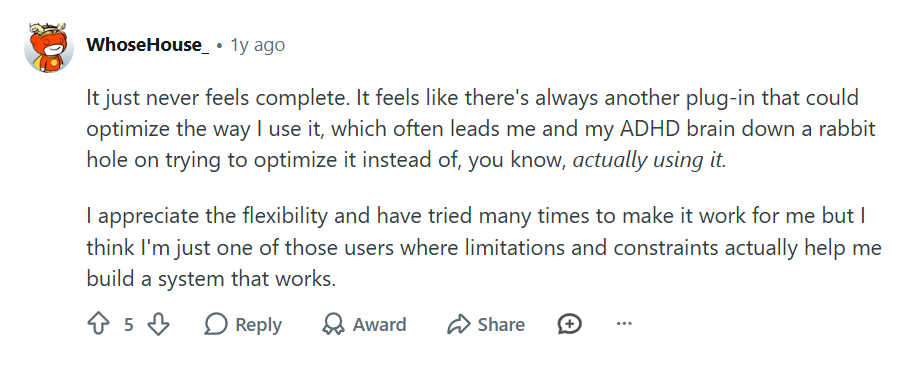
For technically-minded individuals, this is fun. For teams, especially those with non-technical members, it becomes a bottleneck. You're not building a knowledge system anymore; you're maintaining one.
It's telling that one of the most common questions on the Obsidian subreddit comes from people who have watched hours of tutorial videos and still don't know where to start.
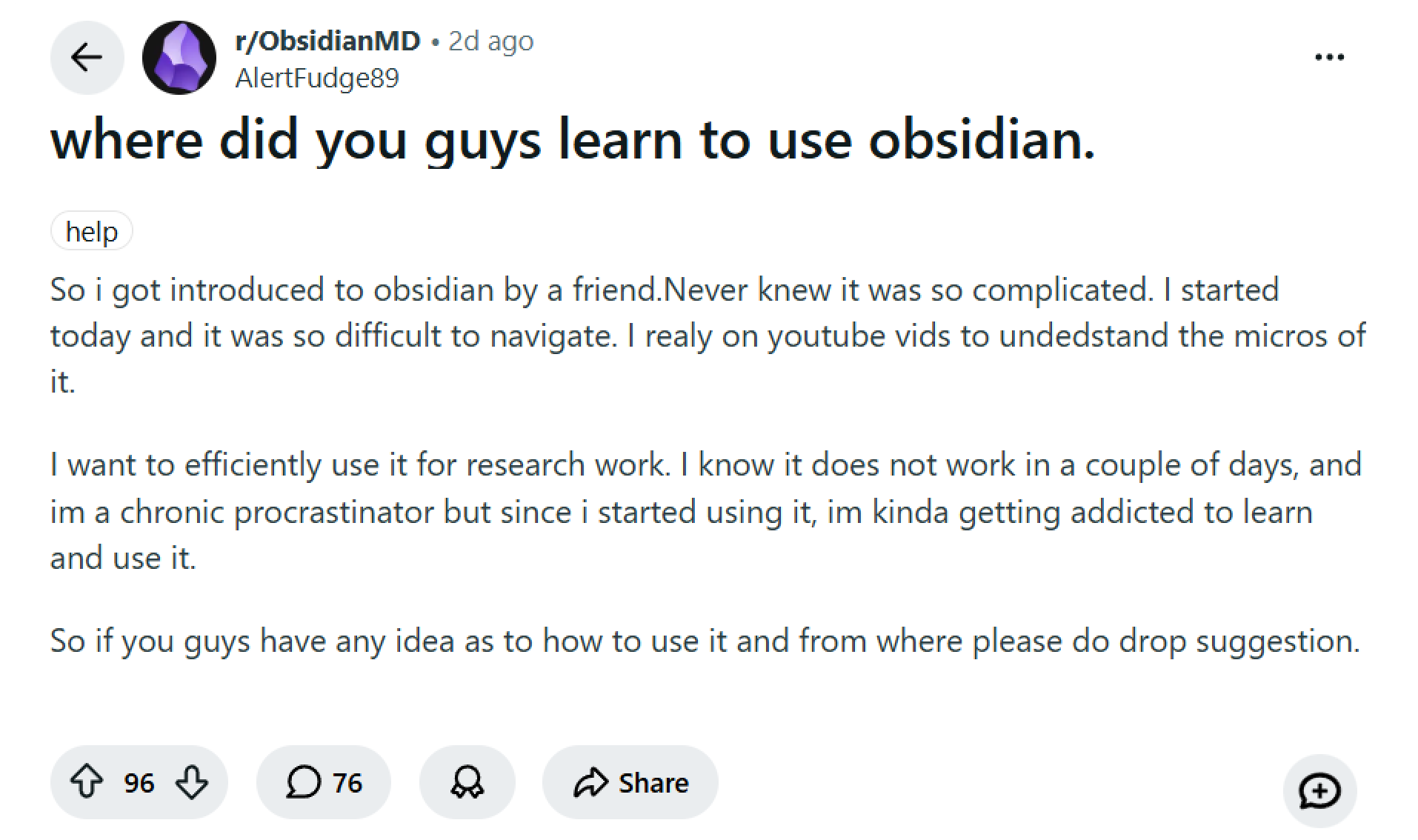
When a tool requires that much learning before it becomes useful, it's not a team tool. It's a personal project.
Markdown Fluency Is Not Optional
Obsidian is a Markdown-native tool. That's great for developers. It's a genuine barrier for marketers, salespeople, consultants, and operations professionals who just want to capture and use knowledge without learning a new syntax.
It's Not Built for the Browser
Even long-time Obsidian power users run into this wall eventually: they love the tool, but there's no native browser access.
Getting your vault online requires either self-hosting through Docker or relying on a third-party service - neither of which is a realistic option for most teams. For distributed or remote teams who work across different devices, this friction is a constant tax on productivity.
What Teams Actually Need from a Knowledge Tool
When multiple people need to work with shared knowledge, a few things become non-negotiable:
- Capture insights from anywhere: web pages, PDFs, videos, social media, without setup or plugins
- Share specific insights with teammates in seconds, not an entire vault that requires context to navigate
- Comment and discuss directly on the content, not in a separate Slack channel three days later
- Granular permissions so the right people have the right level of access
- AI that works from your team's actual curated research, not generic training data
- A system that any team member (technical or not) can use on day one, without a manual or a Reddit thread
This is the gap Cluing fills - whether you're a solo researcher who occasionally shares findings with clients, or a team of twenty building a shared knowledge base from the ground up.
Cluing: How It Actually Works
Cluing is built around a simple but powerful idea: your team's knowledge is only as useful as it is accessible. That means capturing it easily, organizing it together, and being able to act on it, without technical overhead getting in the way.
Here's how the core features work in practice.
Snippets: The Atomic Unit of Knowledge
In Cluing, the fundamental unit isn't a "note" - it's a snippet.
A snippet is a specific, sourced piece of information: a highlighted paragraph from an article, a key insight from a YouTube video, a stat from a PDF, a quote from a LinkedIn post.
Every snippet is automatically tagged with its source, the date it was saved, and any tags your team assigns. This means context is always preserved and you never end up with a note that says "interesting finding" with no indication of where it came from or why it mattered.
This is fundamentally different from Obsidian's approach, where a note is an open-ended document that can contain anything, in any format, with any level of structure (or none at all).
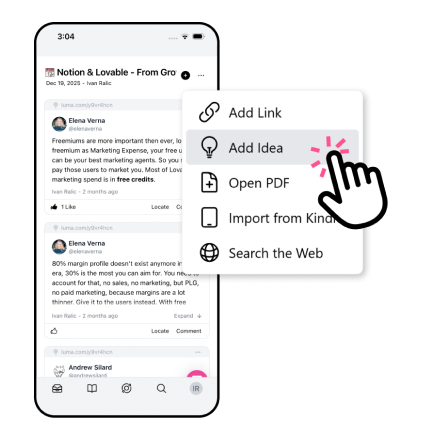
Cluing has a dedicated snippet type for your own original thinking: a quick note, a realization, something you heard at a conference or real-life discussion.
Idea Snippets are marked with a 💡 icon to distinguish them from externally sourced content, and you can optionally attach a link or credit an author. It’s useful when the insight came from a speaker or a conversation rather than a written source.
Browser Extension: Capture from Anywhere, Instantly
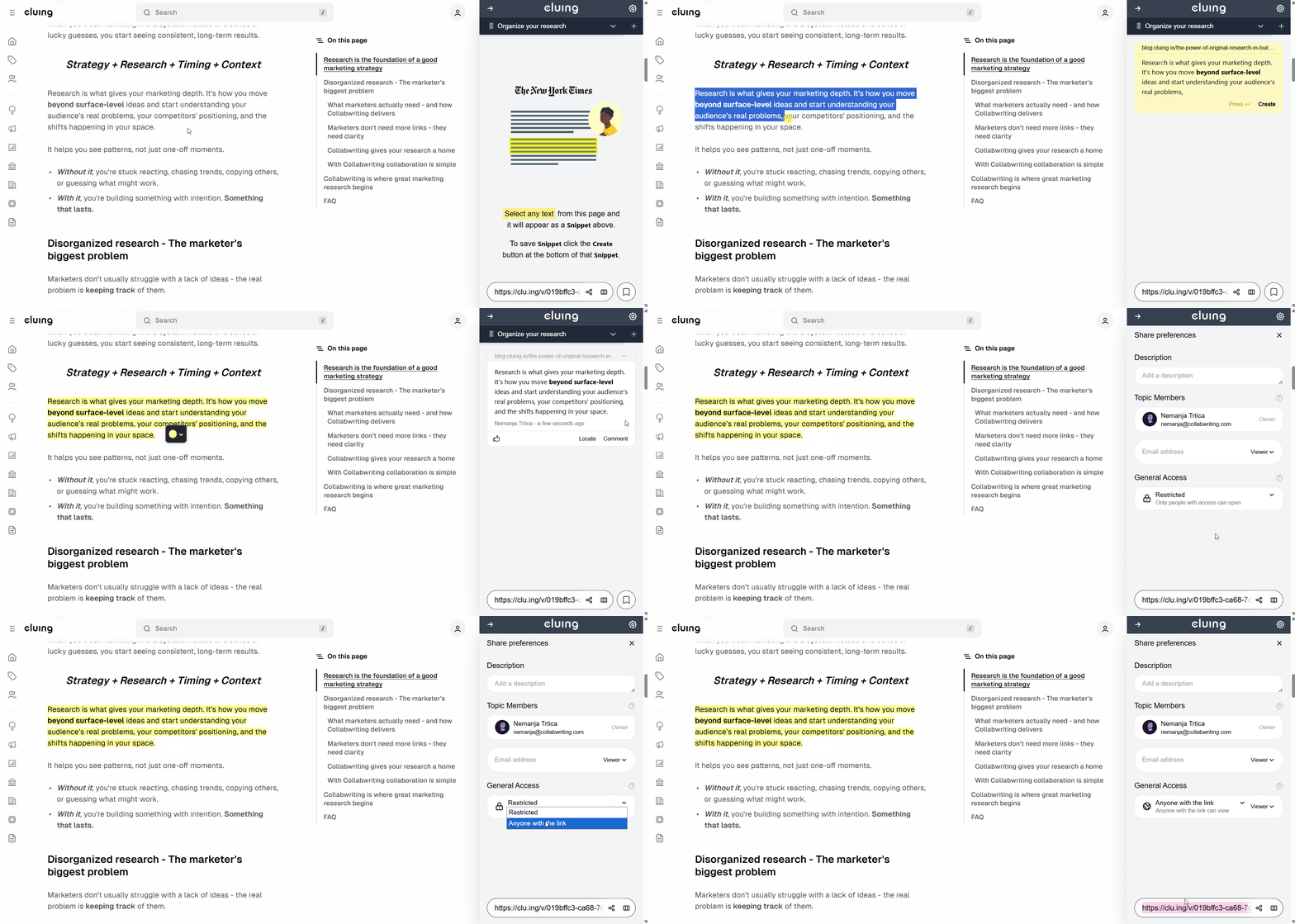
With Cluing's browser extension, any team member can highlight and save a snippet from any online content, PDF, YouTube video, LinkedIn post, X/Twitter thread, Reddit discussion, or Kindle book - with a single click.
This is a core feature, not a plugin. It works consistently across every source, every time, for every team member, whether they're a developer or a marketer.
Topics and Clusters: Structure That Doesn't Require a System
Cluing organizes knowledge into Topics - focused collections of snippets around a specific subject, project, or question.
Topics can be grouped into Clusters for higher-level organization. This gives teams a natural structure without requiring anyone to design it from scratch.
You don't need to spend weeks architecting your vault, choosing between the PARA method or Zettelkasten or some custom hybrid. The structure emerges naturally from how your team actually works.
Speaking of the PARA method, if you want to understand how that methodology maps naturally onto Cluing, Cluing's founder walks through it clearly in this video. 🎥
Collaboration: Comments, Mentions, and Permissions
Team members can comment on any snippet, mention colleagues with @mentions, and discuss insights in context, right next to the content itself, not buried in a Slack thread that nobody will find in three weeks.
Permissions in Cluing work differently depending on how you use it, and that flexibility is one of its underrated strengths.
In a team workspace, all members can see the shared knowledge base by default, which is exactly the point. But you still have the option to create private Clusters visible only to you, even within a shared workspace.
That means a researcher can keep a personal layer of unfinished thinking or sensitive notes alongside the team knowledge base, without it surfacing to everyone else.
In a personal workspace, you work privately by default, but you can invite external collaborators to specific Snippets or Topics and assign them exactly the level of access they need: View, Comment, or Edit. A client, a freelancer, a stakeholder - they all get access to precisely what's relevant to them, nothing more
No need to add them to your entire workspace or restructure how you work.
This kind of granular, contextual access control is built into Cluing from the start, not something you configure through plugins or work around with shared links.
AI Chat: Powered by Your Team's Own Research
Cluing's AI doesn't draw from generic training data.
When your team has curated snippets around a topic, the AI works from that specific, vetted research to answer questions, synthesize findings, and help you move from information to insight.
What makes this particularly powerful is the flexibility underneath it.
Cluing gives you access to the latest AI models so you're never stuck with an outdated engine, and lets you choose from custom AI agents built for specific tasks. Whether you need an agent focused on research synthesis, content creation, or competitive analysis, you pick the one that fits the job.
The result is faster, more reliable decision-making based on what your team actually knows and has verified, not hallucinations from a model that has no idea what your company does or what your research actually says.
Canvas: From Research to Structured Document in One Command
Once your team has gathered research in Cluing's Chat, you can launch the Canvas with a single command: "Add research to Canvas and Open Canvas."
Cluing analyzes the full research conversation and automatically organizes it into a clean, structured visual document.
The Canvas is a starting point, not a final output. Every section is fully editable, which means you can rewrite passages, expand ideas, remove what doesn't fit, and add your own context.
A full formatting toolbar gives you headers, bold, italic, bullet and numbered lists, blockquotes, dividers, and code blocks- basically everything you need to turn a research conversation into a polished draft.
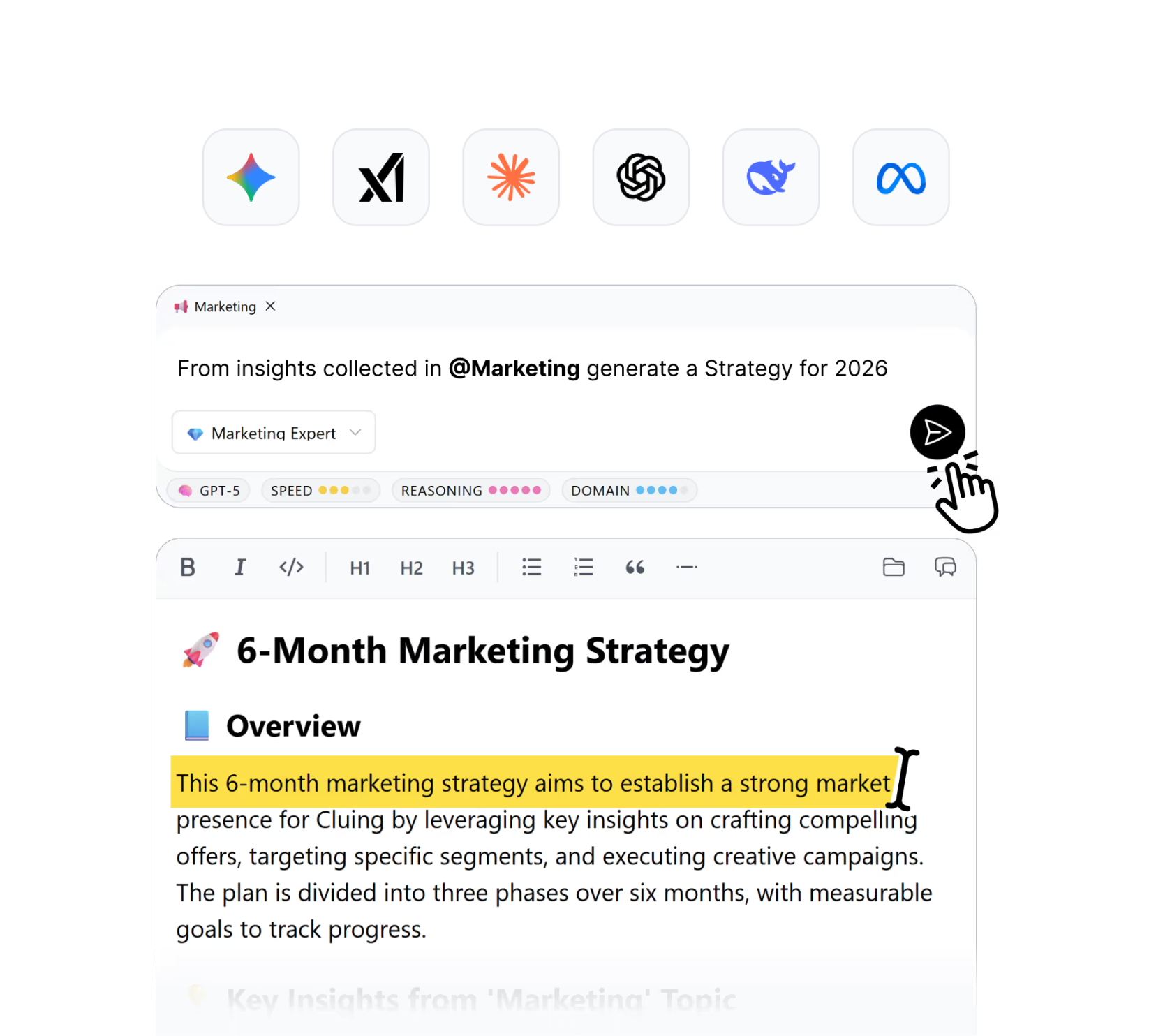
For teams that regularly move from research to deliverable (reports, briefings, strategy documents, content) this collapses what used to be a multi-step, multi-tool process into a single workflow.
Knowledge Graph: A Shared Map of What Your Team Knows
Cluing's Knowledge Graph gives every team member a visual map of everything in the shared workspace - every snippet, every source, every tag - and how they connect.
Each type of connection is visually distinct, so you can immediately see relationships by topic, source, tag, or original content. Simply click any node, open the snippet, and explore its context.
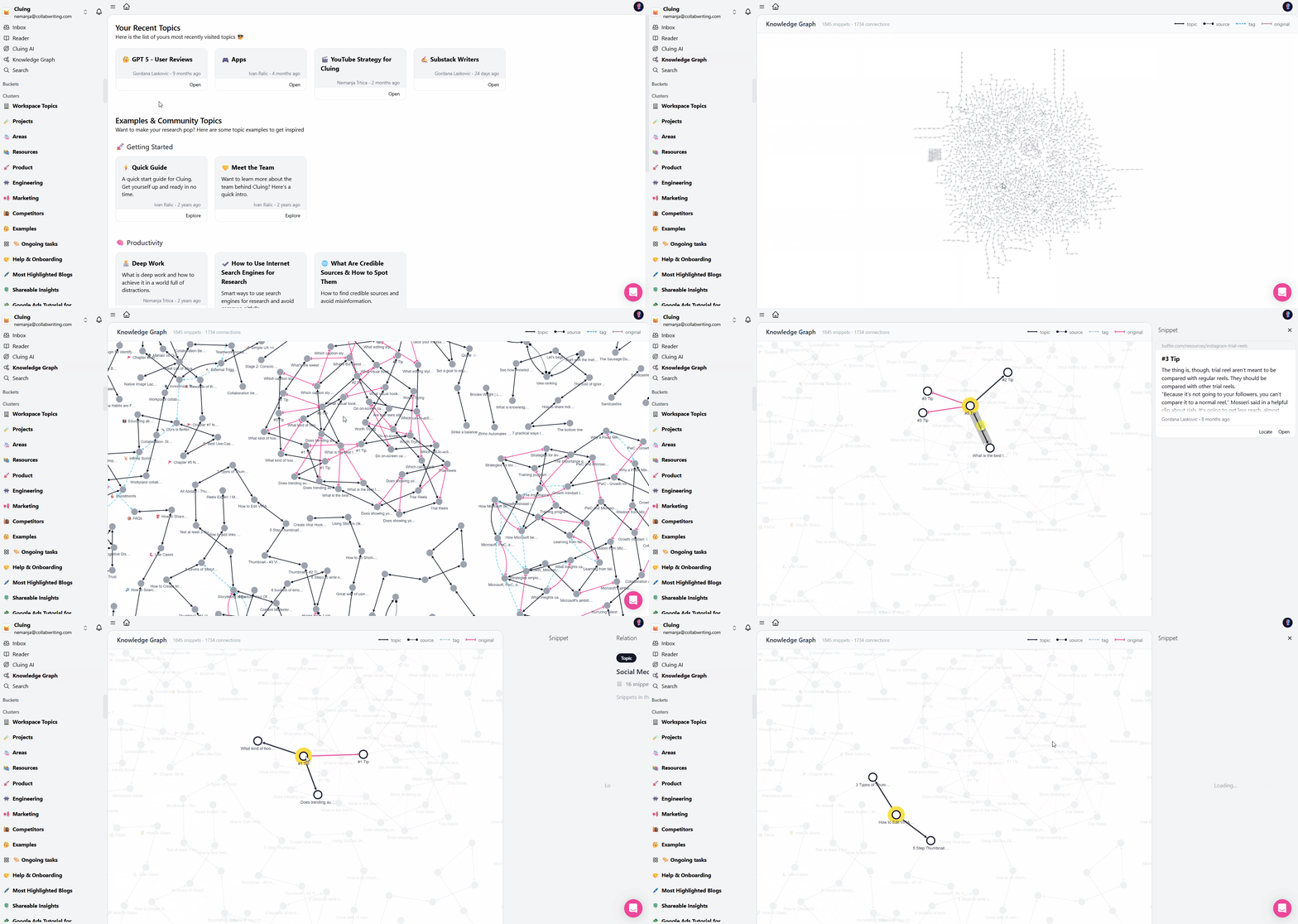
In a personal workspace, the Knowledge Graph is private. In a team workspace, every team member has access, so anyone can see how the organization's knowledge is structured, where ideas connect, and where there are gaps worth filling.
Obsidian has a graph view, but it reflects one person's local vault. Cluing's Knowledge Graph is shared, built on structured sourced snippets, and visible to the whole team by default.
The Core Distinction: Personal PKM vs. Team Knowledge Layer
This is the cleanest way to frame the difference:
Obsidian is a personal knowledge management tool. It helps you build a second brain - a rich, interconnected vault of your own thinking. It's powerful, flexible, and deeply personal. It is not designed to be shared, and everything it does reflects that.
Cluing is a team knowledge layer. It helps a group of people build shared understanding - capturing insights from across the web, organizing them together, and turning that collective research into decisions and deliverables. It is designed to be shared from the first click.
The question isn't which tool is better. It's which problem you're solving. One person's thinking? Obsidian. A team's shared knowledge? Cluing.
Cluing vs. Obsidian for Teams: Side-by-Side
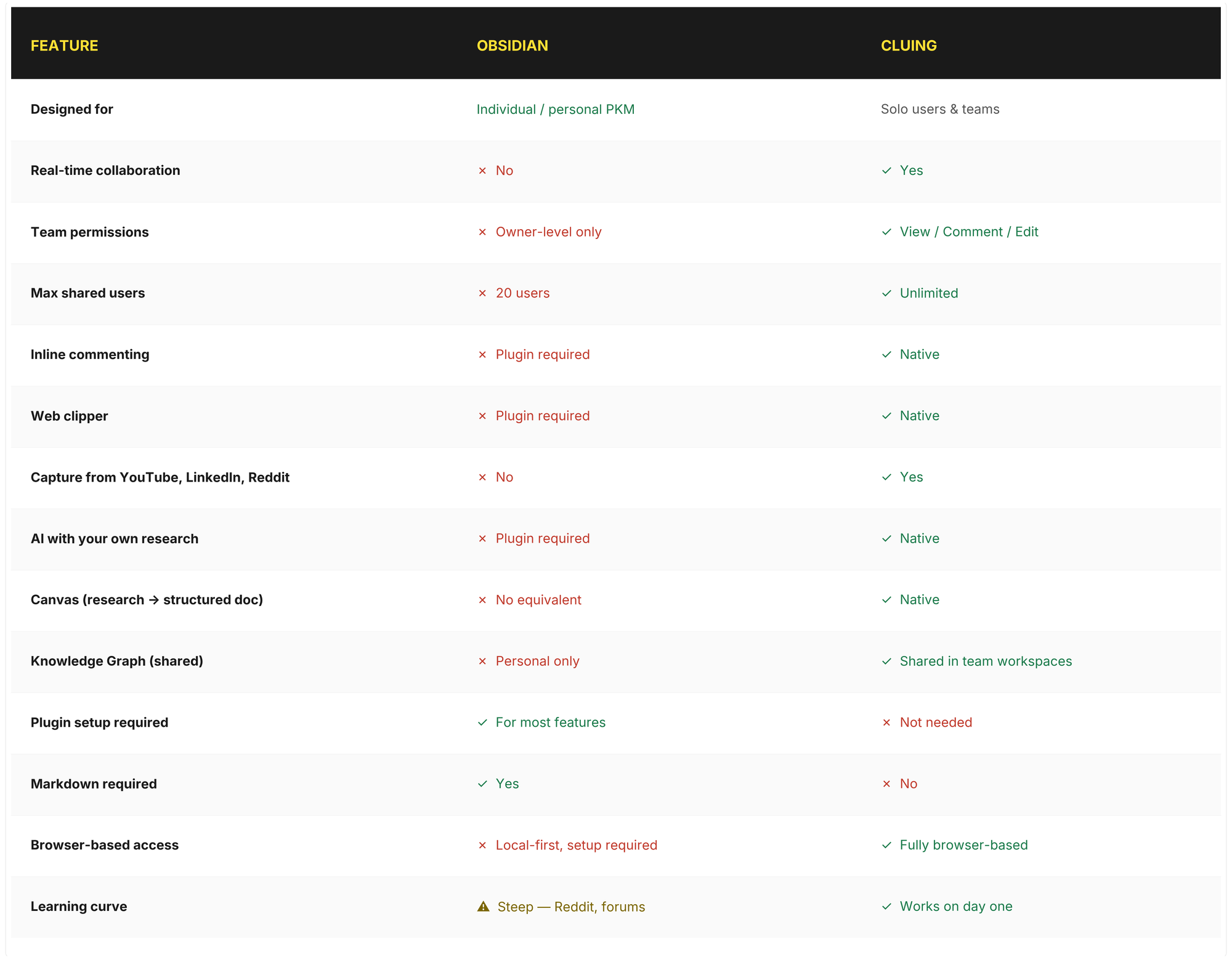
Ready to switch? Try Cluing
The Hidden Cost Nobody Talks About - Setup Time
The real cost of Obsidian for teams isn't the subscription price - it's the time.
Time finding the right plugins. Time configuring them. Time spent on Reddit figuring out why something broke after an update. Time onboarding new team members into a system that was architected by one person who may no longer be around to explain it.
This plays out in a very concrete way when teams try to use Obsidian for client or internal knowledge bases.
A consultant building a knowledge base for a client, wanting clean organization, easy maintenance, and a straightforward handover, has to figure out the entire architecture themselves, from scratch, asking for help in forums just to understand the starting point.
The tool offers no guidance, no defaults for this use case, and no structure to work from.
Cluing eliminates this entirely. There are no plugins to install, no configuration to design, no tribal knowledge required. A new team member can be fully onboarded in minutes, not weeks, and they don't need to understand any system before they can contribute.
Your team can be up and running in minutes, not weeks →
When Obsidian Is Still the Right Choice
This isn't a takedown of Obsidian. It's genuinely excellent for the right person.
Choose Obsidian if you're a solo knowledge worker who values local-first privacy, enjoys building a custom workflow with plugins, and is comfortable with Markdown. It's a strong fit for developers who want Git-based note versioning and prefer to keep everything on their own machine.
But if you're looking for an Obsidian alternative for teams and especially one that doesn't require everyone on the team to become a power user before they can contribute, Obsidian's architecture will work against you from the start.
The Bottom Line
Obsidian changed the way individuals think about personal knowledge management. That's a real achievement, and it deserves its reputation.
But building a knowledge layer that a whole team can contribute to, search, and act on together is a different problem, and it requires a tool built for that purpose.
Cluing is the Obsidian alternative for teams who need to move fast, stay aligned, and turn shared research into decisions and deliverables, without spending weeks on setup, plugins, or learning curves first.
If you have a team or want to build a shared knowledge base together, start here: Cluing for Teams
FAQs 🧐
Can Obsidian be used for team collaboration?
Technically yes, but it wasn't built for it. Shared vaults are limited to 20 users, there's no real-time co-editing, no native commenting, and no granular permissions. Most team features require plugins.
What is the main difference between Cluing and Obsidian?
Obsidian is a personal knowledge management tool built around local Markdown files. Cluing is built for both solo users and teams, with native collaboration, shared knowledge graph, AI chat, and no plugins needed.
Does Cluing require any plugins or setup?
No. Every feature - web clipper, comments, AI chat, Canvas, Knowledge Graph - works out of the box. No plugins, no configuration, no learning curve.
Can I use Cluing as a solo user?
Yes. Cluing works great for personal knowledge management, and you can share specific Topics or Snippets with external collaborators whenever you need to - with full permission control.
Does Obsidian have a browser version?
No native browser version exists. Accessing your vault from a browser requires self-hosting via Docker, which is a significant technical setup most teams can't realistically do.
Is Cluing only for large teams?
No. Cluing works for solo users, small teams, and larger organizations. Even as a solo user, you can invite external collaborators with granular permissions without restructuring your workspace.
How does Cluing handle knowledge organization?
Through Snippets, Topics, and Clusters. You capture sourced insights, organize them into Topics, group Topics into Clusters, and visualize all connections through the shared Knowledge Graph.


![The Best Reddit Threads Disappear in a Week. Here's How to Keep Them [2026]](https://storage.ghost.io/c/9f/9d/9f9d32ee-55b4-4411-b435-9dc854e1751c/content/images/size/w600/format/webp/2026/06/reddit-cover.png)

![Read it later system for LinkedIn posts - Save, organize, and use what you find [2026]](https://storage.ghost.io/c/9f/9d/9f9d32ee-55b4-4411-b435-9dc854e1751c/content/images/size/w600/format/webp/2026/06/blog-3.png)


![Cognitive Capital - The New Layer of Value [2026]](https://storage.ghost.io/c/9f/9d/9f9d32ee-55b4-4411-b435-9dc854e1751c/content/images/size/w600/format/webp/2026/05/covers--9-.png)