



Are you tired of tools and browser extensions that claim to help organize your information in seconds but always seem to be missing just one more thing? Ever spent hours searching for something you knew you had saved, only to come up empty?
We've all been there.
Most people assume the fix is yet another AI productivity tool. But the real problem is almost never the tool - it's the lack of a system. A system like the PARA method: simple enough to actually stick with, flexible enough to handle how work really happens, and smart enough to keep your knowledge accessible without turning into another source of clutter.
It's been around for over a decade and it still holds up - because it's built around how people actually think, not around how productivity gurus think people should think.
Here's how it works, what most people get wrong about it, and how to implement it without losing your mind.
What is the PARA method?
PARA is a productivity framework that focuses on four key aspects:
- Projects
- Areas
- Resources
- Archives
It was introduced in Chapter 5 of Tiago Forte's book Building a Second Brain (2022). The idea proved popular enough that Forte followed it with a standalone book - The PARA Method (2023) - dedicated entirely to the framework.
While productivity tactics like the Pomodoro Technique help you manage your time, PARA focuses on managing your knowledge - making sure the right information is there when you actually need it.
What makes PARA different from most organizational systems is how little maintenance it requires. Once the four categories click, it runs almost on autopilot.
Projects - Active work with a clear end point
In PARA, a project is any piece of work with a defined beginning and end.
The simplest way to test whether something belongs here: does it have a finish line? If not, it probably belongs somewhere else.
A campaign launch is a project. A product redesign is a project. Onboarding a new client is a project. Each one has a goal, a timeline, and a point at which it's done. Everything related to that work - research, references, notes, examples - lives in one place for the duration. When the project closes, so does the folder.
Other examples:
- Launching a new product or marketing campaign
- Writing and publishing a research paper or content series
- Preparing for a certification, presentation, or event
Areas - Ongoing responsibilities that never really end
Areas are the domains of your life or work that you're always tending to, without a fixed end date. Where projects have finish lines, areas just have standards you're trying to maintain.
If you work in marketing, your areas might be content strategy, brand voice, or competitive research - not specific campaigns, but the ongoing work that makes campaigns possible. These are the places where you consistently file useful things you come across, so they're ready when a project needs them.
Personal examples could include health, finances, or professional development - responsibilities that are always running in the background, whether or not you have an active project tied to them.
Resources - A curated reference library you actually use
Resources are topic-based collections that you return to repeatedly, not tied to a specific project or responsibility, but useful across many of them.
Think of it as a personal library: bookmarks, templates, breakdowns, frameworks, and curated reading lists organized by topic.
The difference between a Resource and a random bookmark is intent.
A Resource is something you've deliberately organized to be findable and reusable - a breakdown of a methodology you keep referencing, a collection of examples for a type of content you produce regularly, or notes from an event or course that still inform how you work.
For example, you might create a resource collection around:
- Storytelling techniques
- AI trends
- Productivity systems
- Customer research methods
The goal is to build a curated library of knowledge you can actually use.
Archive - The most important bucket, and the most misunderstood one
Here's where most people go wrong with PARA.
The Archive is where you move things that are no longer active - completed Projects, Areas you've stepped away from, Resources that are no longer relevant.
💡 Keeping the Archive clear of your active workspace is what stops your second brain from becoming a second junk drawer.
The problem is that real work is messier than the theory suggests.
Projects don't always end cleanly. A long-running initiative might still be active, but half the research you collected three months ago is no longer relevant. You don't want to archive the whole project - it's still live. But leaving outdated snippets in your active view means your workspace gradually gets noisier and harder to use.
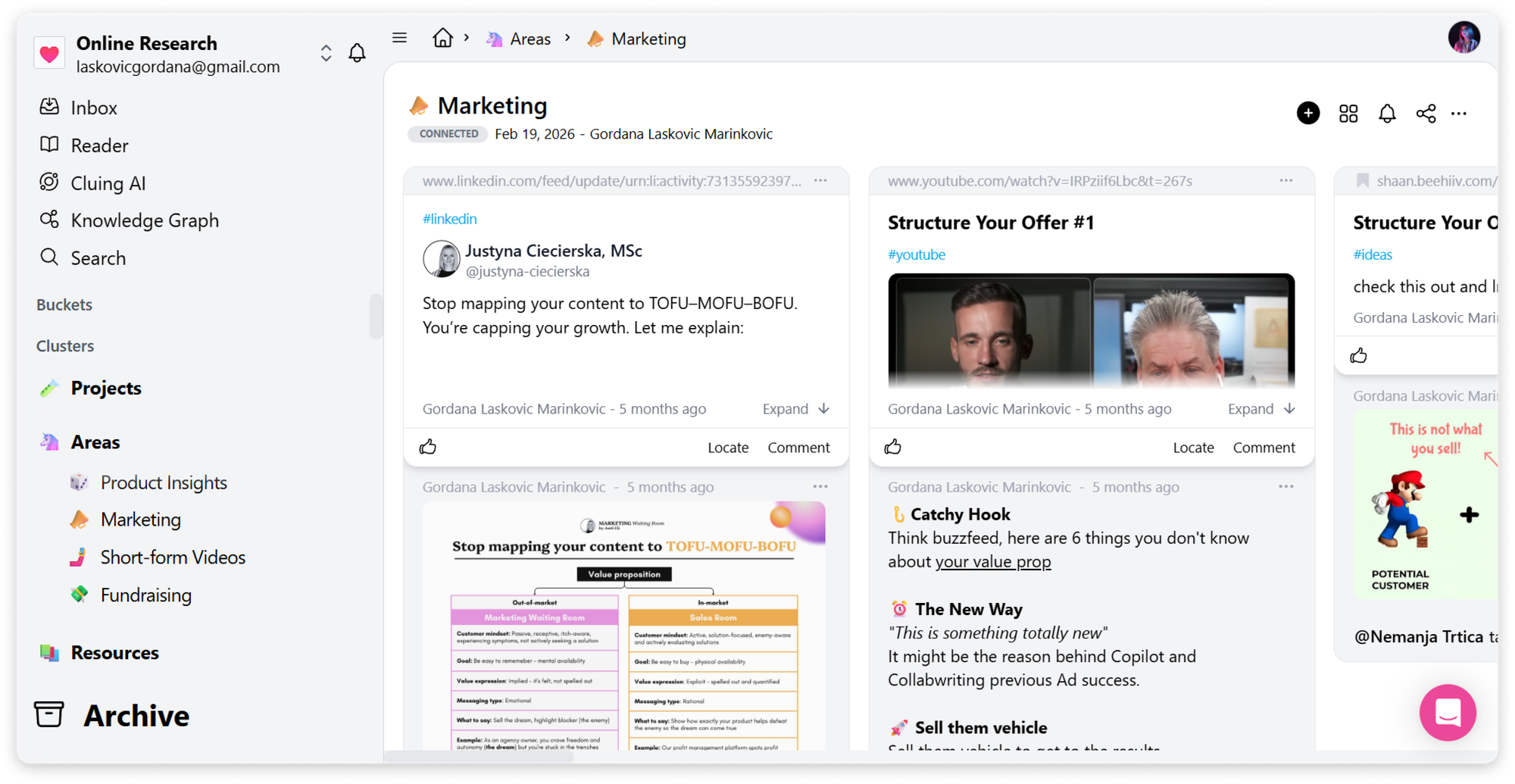
This is where most productivity tools hit a wall: the archive-or-not decision becomes a bottleneck, and people stop maintaining the system altogether.
Think of it as moving information out of your way - not throwing it away.
Where traditional PARA systems fall short
The PARA method is elegantly simple in theory. In practice, it runs into one persistent problem: information doesn't stay neatly categorized for long.
A project might still be active, but half the research you collected two months ago is no longer relevant. An area of responsibility continues for years, while specific notes and ideas quietly become outdated. You know you shouldn't archive the whole thing (work is still happening there) but leaving stale snippets in your active workspace means the clutter slowly creeps back in.
Most productivity tools force you into a binary choice: keep everything visible and deal with the noise, or archive entire projects and lose the context you might still need.
Neither option is actually good. And over time, maintaining the system starts to feel like more work than it saves.
This is where most people quietly abandon PARA - not because the framework is flawed, but because the tools don't support how messy real work actually is.
How to implement the PARA method with Cluing and build your second brain
The PARA method gives you a framework for organizing your knowledge. Cluing gives you the tools to make that framework part of your everyday workflow.
It's built around one core idea: you shouldn't just save information - you should be able to find it, use it, and build on it.
Step 1: Capture knowledge from anywhere
With Cluing, you can save insights from almost anywhere online without interrupting your workflow. Instead of saving an entire webpage "just in case," you can keep only the things that are actually valuable.
You can:
- Highlight and save from any webpage, PDF, or import your Kindle highlights directly
- Save posts, threads, and comments from LinkedIn, X, Reddit, and Quora in one click
- Capture timestamped screenshots from YouTube and TikTok, or save the transcript
- Forward emails and newsletters directly into your knowledge base
- Summarize any webpage into a snippet in seconds
- Add comments and notes to keep the reasoning behind what you save
Every saved insight becomes part of your knowledge base instead of another forgotten bookmark.
Step 2: Organize everything using PARA
Once you've captured your insights, organize it using the PARA framework.
To map PARA onto Cluing, start by creating four Clusters - one for each category: Projects, Areas, Resources, and Archive. Clusters are the top-level containers; inside each one, you create Topics for specific threads of research or work.
Here's what that looks like in practice:
- Projects - Create a Topic for each active project. If you're running a product launch, a Topic called "Q3 Campaign" holds every relevant article, competitor example, and reference you collect while the work is in progress. When the project closes, move the entire Topic into your Archive Cluster. It's out of your active view, but fully searchable whenever you need it.
- Areas - Create a Topic for each ongoing domain you maintain. If content strategy is a permanent part of your role, a Topic called "Content Strategy" is where you drop anything worth keeping — a newsletter breakdown, a LinkedIn post with an insight you want to revisit, a framework from a podcast. No project attached. It just lives there, ready.
- Resources - Create Topics by subject matter, not by project. A Topic called "Storytelling Frameworks" or "SEO Resources" or "Competitor Examples" collects material you'll pull from across multiple projects over time. These are your reference libraries — curated, not dumped.
- Archive - This is where completed Projects and dormant Topics go. Nothing gets deleted. Everything stays searchable. When you need to revisit an old project for context or reference, it's there.
As your work evolves, Topics can easily be moved between Clusters without losing any context.
When you sign up for Cluing, the four PARA clusters - Projects, Areas, Resources, and Archive - are already waiting for you. No setup required. Just open the app and start adding Topics inside each one.
Step 3: Keep your knowledge base clean
One of the biggest challenges with PARA is keeping your system organized over time.
Many tools force you to either leave outdated information inside active projects or archive an entire project even though you're still working on it.
Cluing gives you a better option.
Instead of archiving an entire Topic, you can simply mark individual snippets as done.
Completed snippets disappear from your active workspace while remaining fully searchable and available in the Completed view whenever you need them again.
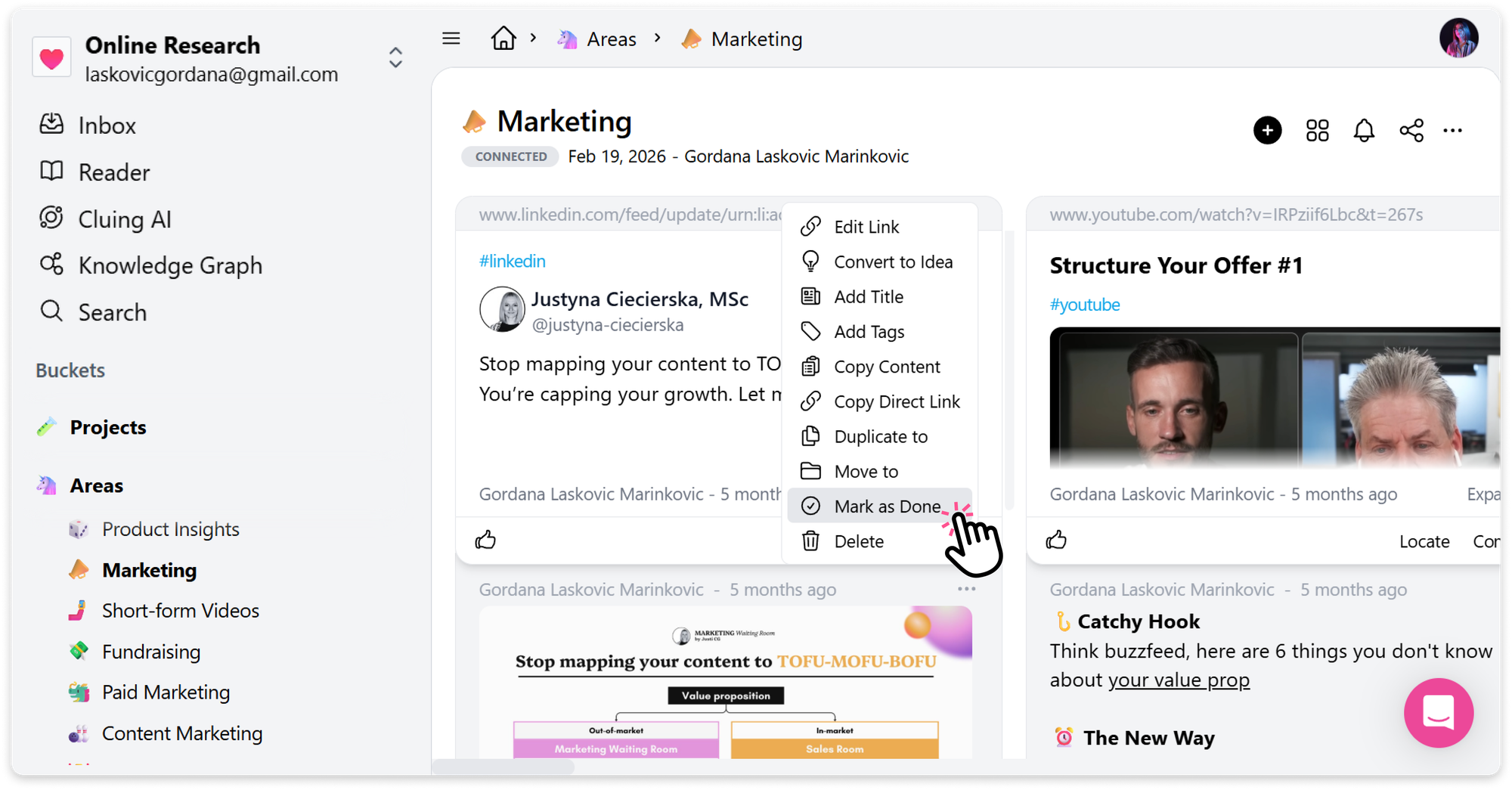
This keeps your Projects and Areas focused on what's currently relevant without losing valuable context.
If your workspace starts growing, the Workspace Organizer can also help organize Topics automatically, reducing manual maintenance as your knowledge base expands.
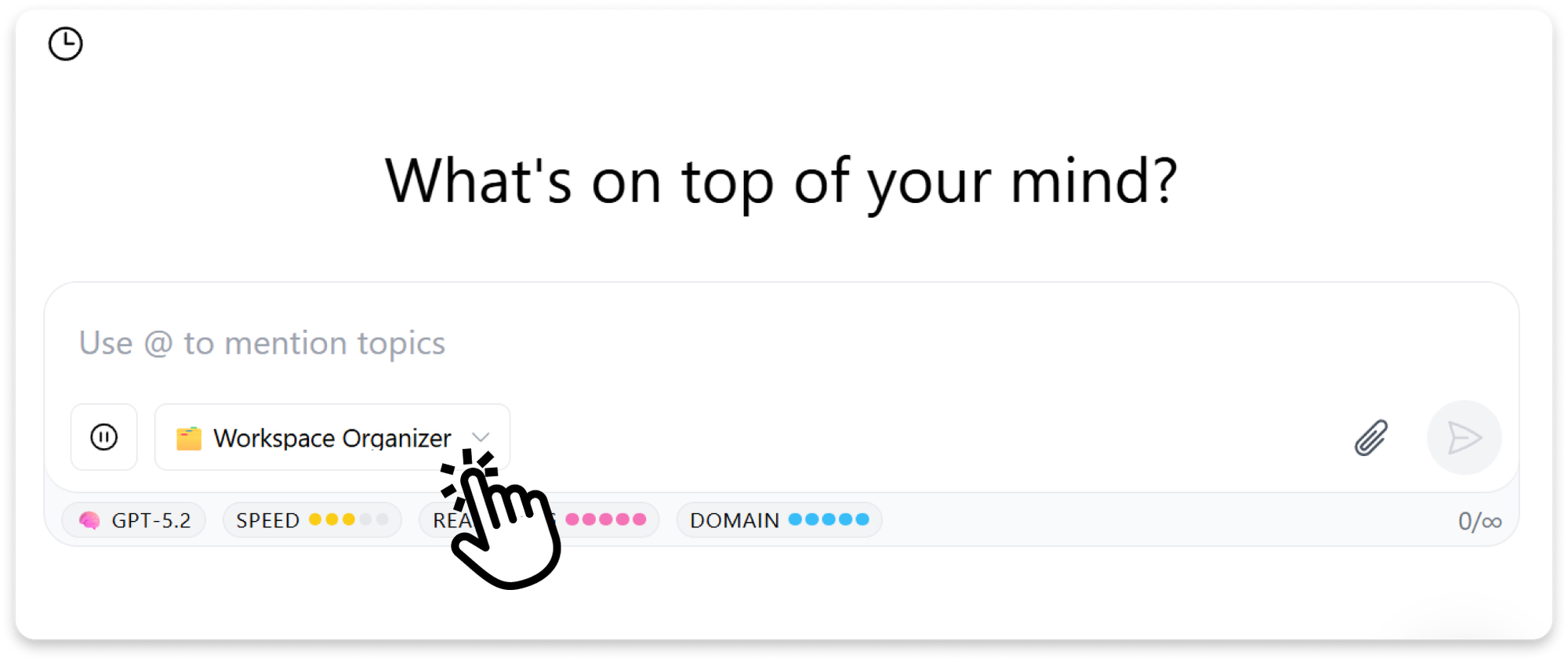
Cluing also lets you highlight and annotate PDFs, export Topics to Google Docs or Notion, and capture content from LinkedIn, X, Reddit, TikTok, Instagram, YouTube, Kindle, and Substack newsletters — all feeding into the same organized system.
See how Cluing connects with your favorite tools →
Go further: actually use what you know
Organizing knowledge is only half the equation. The other half is being able to use it.
Once your research is structured inside Topics, Cluing's AI Chat lets you have a real conversation with it.
Type @ followed by any Topic name to pull in all the snippets and comments you've saved there - then ask questions, generate summaries, or draft content grounded in your own research, not just whatever the open web returns.
You can even upload documents and images directly into AI Chat or connect your Cluing workspace to external AI tools using the native MCP integration, so your knowledge is available wherever you work.
→ Summarize research
→ Compare ideas across multiple sources
→ Generate articles, reports, and presentations
→ Identify patterns you may have missed
→ Create new snippets, ideas, or Topics from your conversations
🤖 AI Chat gives you access to frontier models - Claude, ChatGPT, Gemini, Grok, DeepSeek
When you've gathered what you need, type "Open in Canvas" to turn the conversation into a structured, editable document — ready to publish, share, or hand off.
This is what makes Cluing a step beyond a second brain: your organized knowledge doesn't just sit there; it works for you. PARA tells you where to put information. Cluing's AI Chat helps you figure out what it means.
Here's what people say about Cluing →
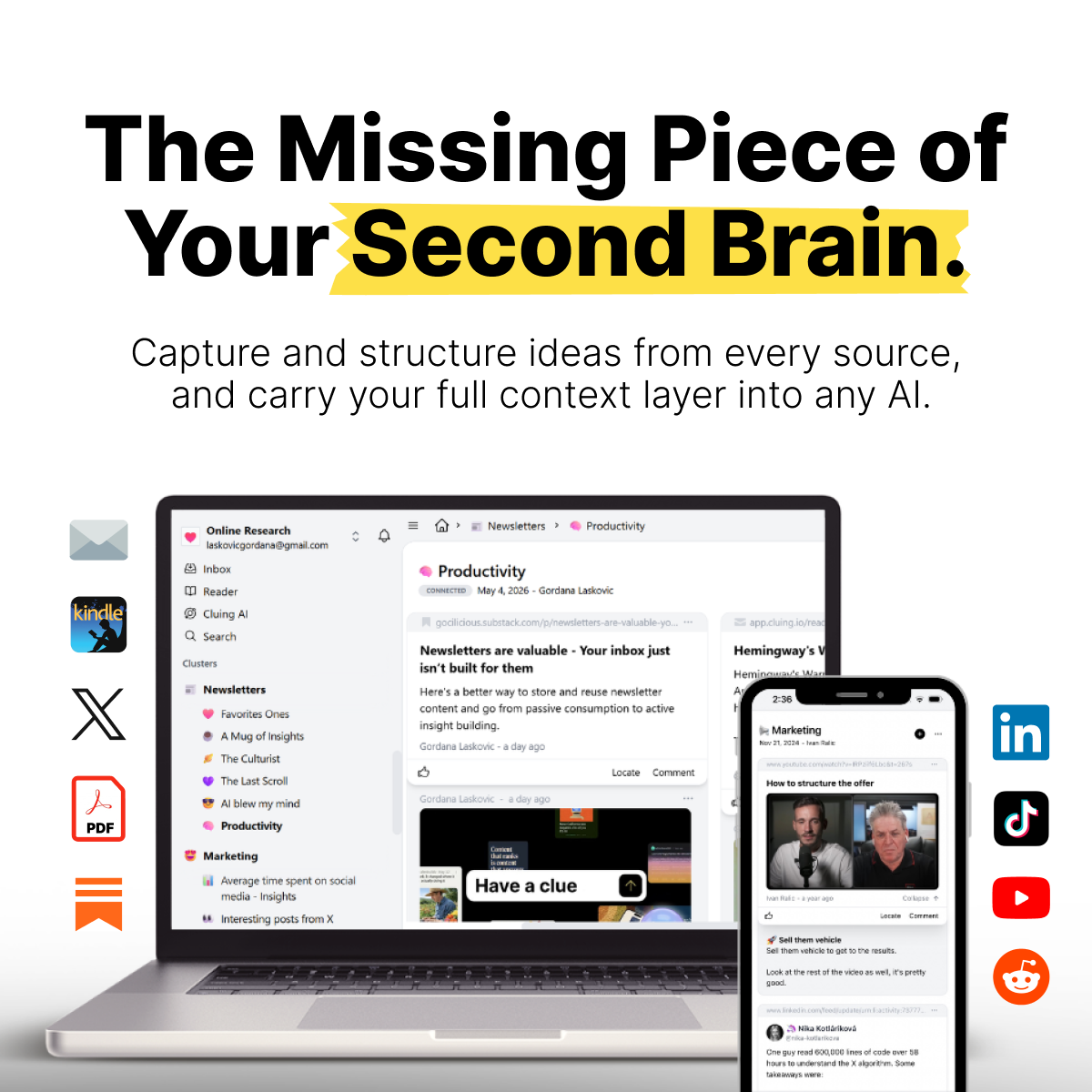
Build Your Second Brain with Cluing
A second brain that executes - Capture sources, mark what matters, and carry your full context layer into any AI
The value of the PARA method
- Everything is findable. When information lives in the right category from the start, you stop hunting for it. The right insight is where you'd expect it to be, before you need it.
- Low barrier to entry. PARA has four categories. That's the whole system. You don't need to be a productivity expert to use it — you just need to be consistent about which category something belongs in, and that decision usually takes about two seconds.
- Clearer priorities. Asking "does this have a finish line?" instantly clarifies whether something is a project or an ongoing area of responsibility. That one distinction changes how you allocate your attention.
- Better team transparency. When research and references live in a shared, organized workspace, everyone knows what exists, where it is, and what's still active. Transparency stops being a process and starts being a side effect of how you work.
The benefits of having a system in place
Knowledge is only valuable if you can find it, understand it, and use it when it matters.
PARA gives you the system. Cluing brings it to life. Together, you get a workspace where everything you research is organized by how you actually work - with a Mark as Done feature that keeps active projects clean without throwing anything away, AI Chat that lets you query your own knowledge base, Canvas to turn insights into output, and a mobile app so you can capture ideas wherever you are.
📂 When you keep losing information you know you've already found once.
📃 When your notes app, bookmarks, and browser tabs are all saying different things.
👌 When a new project kicks off and you want a clean place to put everything from day one.
📚 When you're juggling multiple subjects or workstreams and the context-switching is killing your focus.
⚡ When you're ready to stop collecting and start actually using what you know.
FAQ🧐
What does PARA stand for?
PARA stands for Projects, Areas, Resources, and Archives - the four categories that make up the framework. Projects are active efforts with a clear end point, Areas are ongoing responsibilities with no fixed end date, Resources are topic-based reference libraries you return to over time, and Archives hold anything that's no longer active but still worth keeping.
What's the difference between a Project and an Area?
The simplest test is to ask: "Does it have a finish line?" A Project has a defined beginning and end - like launching a campaign or preparing for a certification. An Area is an ongoing responsibility with no end date, such as health, finances, content strategy, or brand voice. Projects get completed; Areas are maintained to a standard indefinitely.
What's the difference between a Resource and a random bookmark?
The difference is intent. A bookmark is something you saved "just in case."
A Resource is something you've deliberately organized to be findable and reusable - a methodology breakdown you keep referencing, a curated collection of examples, or notes from a course that still inform how you work. Resources are your personal library, organized by topic rather than tied to a single project.
Why is the Archive considered the most misunderstood part of PARA?
Because most people treat archiving as an all-or-nothing decision. The Archive is meant to hold completed Projects, dormant Areas, and outdated Resources - keeping them out of your active workspace while remaining fully searchable. The problem is that real work is messier than the theory: a project can still be active while half its research has gone stale. Forcing a binary "archive it all or keep it all" choice is exactly where most people abandon the system.
Why do people abandon the PARA method?
Usually not because the framework is flawed, but because their tools don't support how messy real work actually is. A project can still be active while half its research has gone stale. When you're forced to either leave clutter in active projects or archive an entire project you're still working on, maintaining the system starts to feel like more work than it saves.
How do I keep my workspace clean without archiving an entire project?
In Cluing, instead of archiving a whole Topic, you can mark individual snippets as done. Completed snippets disappear from your active workspace while staying fully searchable in the Completed view. This keeps your Projects and Areas focused on what's currently relevant without throwing away valuable context.
How do I set up PARA in Cluing?
Start by creating four Clusters, one for each PARA category. Inside each Cluster, create Topics for specific threads of work: a Topic per active project under Projects, a Topic per ongoing domain under Areas, and topic-based reference libraries under Resources. As your work evolves, you can move Topics between Clusters without losing any context.
Can I actually use the knowledge I've organized, or does it just sit there?
You can put it to work. Once your research is structured into Topics, Cluing's AI Chat lets you type @ followed by a Topic name to pull in all its snippets and comments, then ask questions, generate summaries, or draft content grounded in your own research. When you're ready, type "Open in Canvas" to turn the conversation into a structured, editable document — ready to publish, share, or hand off.


![The Best Reddit Threads Disappear in a Week. Here's How to Keep Them [2026]](https://storage.ghost.io/c/9f/9d/9f9d32ee-55b4-4411-b435-9dc854e1751c/content/images/size/w600/format/webp/2026/06/reddit-cover.png)

![Read it later system for LinkedIn posts - Save, organize, and use what you find [2026]](https://storage.ghost.io/c/9f/9d/9f9d32ee-55b4-4411-b435-9dc854e1751c/content/images/size/w600/format/webp/2026/06/blog-3.png)


